

You might have an ad running right now, but it’s going to the wrong place on your website.
It happens more often than you’d think. Maybe the page has changed. Maybe you selected the wrong URL when setting the ad up. Or maybe you’ve realised there’s a better page to send traffic to.
In this guide, I’m going to show you exactly how to change the destination URL in Google Ads, step by step, so you can fix it quickly and stop wasting clicks.
How to Change the Destination URL in Google Ads
Here’s exactly what you need to do.
1. Log in to Your Google Ads Account
Head into your Google Ads account as normal.
From the left-hand menu:
Click on Campaigns
Select the campaign your ad is in
2. Go to the Correct Ad Group
Once you’re inside the campaign:
Click on the Ad group that contains the ad you want to edit
This ensures you’re looking at the correct ads before making any changes.
3. Navigate to Ads
Now go back to the left-hand side menu.
Under Campaigns:
Click on Ads
You should now see the ads within the ad group you selected.
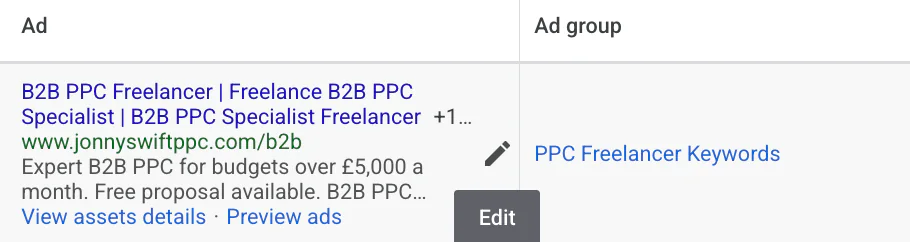
4. Edit the Ad
Find the ad where the link is wrong.
Click on the ad
Select Edit
You’ll see a pencil icon indicating you’re editing the ad
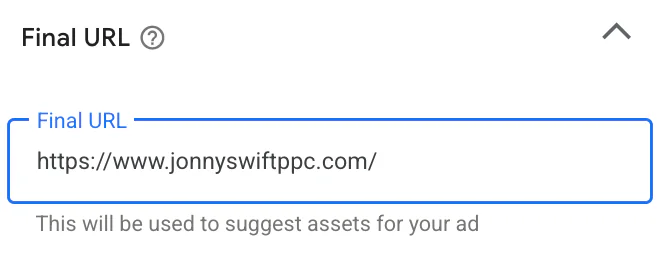
At the top, you’ll see a field labelled Final URL.
This is the destination URL of your ad.
All you need to do is:
Replace the existing URL with the correct one
That’s it. That’s the main change.
What About Mobile URLs?
There’s one more thing worth checking.
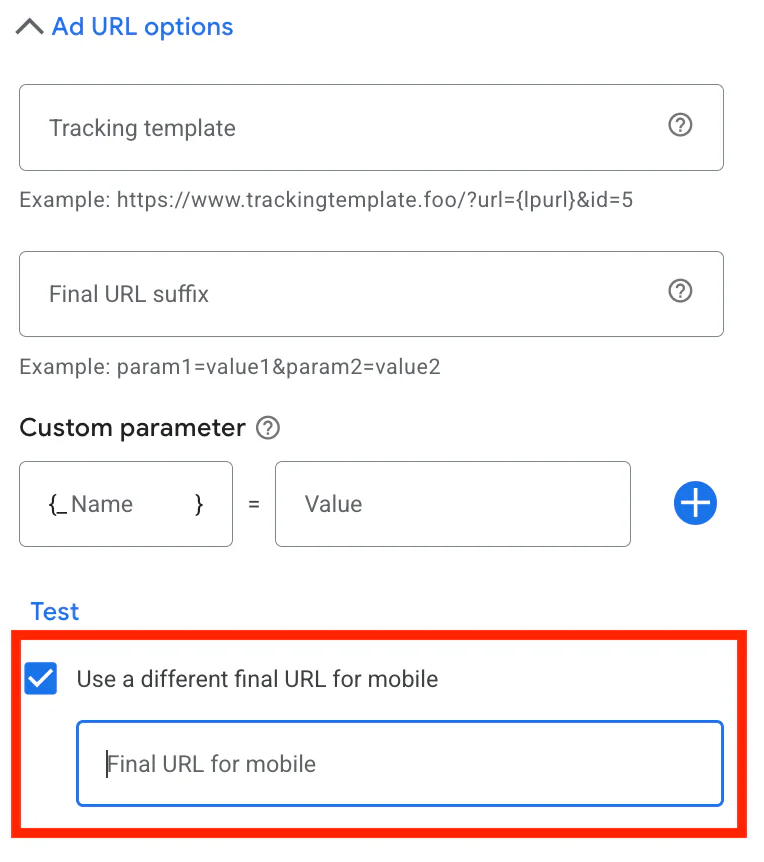
Scroll down to the bottom of the ad settings and click Add URL options.
If you’ve previously set up a different link for mobile users, you’ll see:
A tick box for Use a different final URL for mobile
If this is enabled, you can:
Remove it
Change the mobile URL
Or leave it as it is if it’s correct
If this option isn’t visible in your account, don’t worry. Just leave it.
Once you’ve finished making changes:
Click Save ad
Your destination URL is now updated.
Why Would You Want to Change the Destination URL?
There are several genuine reasons you might need to do this.
1. There’s a More Relevant Page
This is probably the most common reason.
For example:
You’re promoting a specific product
But the ad is sending traffic to a general category page
Or even worse, the homepage
If there’s a more appropriate page, sending traffic there will usually improve:
Conversion rate
Quality Score
Return on ad spend
2. The URL Is Faulty
Sometimes the page is broken.
If people are clicking and landing on:
A 404 page
A slow-loading page
Or a page where the form doesn’t work
You’re literally paying for wasted traffic.
This is something I always check when auditing accounts.
3. The Information Is Outdated
Maybe:
Prices have changed
Offers have expired
Services have been updated
If the landing page no longer reflects what your ad promises, performance will drop quickly.
4. You’re Running an A/B Test
This is where it gets more strategic.
You might want to test:
Two different landing pages
A long-form page vs a short page
A product page vs a dedicated landing page
Changing the final URL allows you to test what actually converts better, rather than guessing.
A Quick Word of Caution
Before you change the destination URL, ask yourself:
Does this page match the intent of the keyword?
Does it clearly reflect the ad messaging?
Is it optimised for conversions?
Sending traffic to the “wrong” page can reduce Quality Score and increase your cost per click over time.
The destination URL isn’t just a link. It’s a big part of overall campaign performance.
Conclusion
Changing the destination URL in Google Ads is actually very straightforward.
You just need to know where to go:
Campaigns
Ad group
Ads
Edit
Change the Final URL
Save
That’s it.
But while it’s technically simple, strategically it matters a lot. The right landing page can dramatically improve conversion rate and overall profitability.
If you're interested in professional PPC management to grow your business, feel free to get in touch via my contact page at jonnyswiftppc.com/contact. I'd be happy to discuss how PPC can work for you.
Related Google Ads Guides
If you’re updating your adverts or landing pages, you may also find these guides useful: