

You might have heard the term sitelink when talking about PPC or Google Ads and wondered what it actually means.
In this blog post, I’m going to explain exactly what a sitelink on Google Ads is, how it appears within your ads, and why it can make a real difference to both click-through rates and conversions.
I’ll also show you how to add sitelinks inside Google Ads and explain when you should use them.
By the end, you’ll have a clear understanding of how sitelinks work and how they help guide potential customers to the exact page they’re looking for.
What Is a Sitelink on Google Ads?
A sitelink is essentially a subsection of your Google Ads search advert.
When someone searches on Google and your ad appears, the ad normally consists of:
A headline
Descriptions
A display URL
Underneath that main ad section, Google may also show sitelinks.
These are additional clickable links that take the user to specific pages on your website.
Example
A good example is a large retailer like Adidas.
You might see the main advert for the Adidas store, and then underneath it sitelinks such as:
Men's Shoes
Women's Shoes
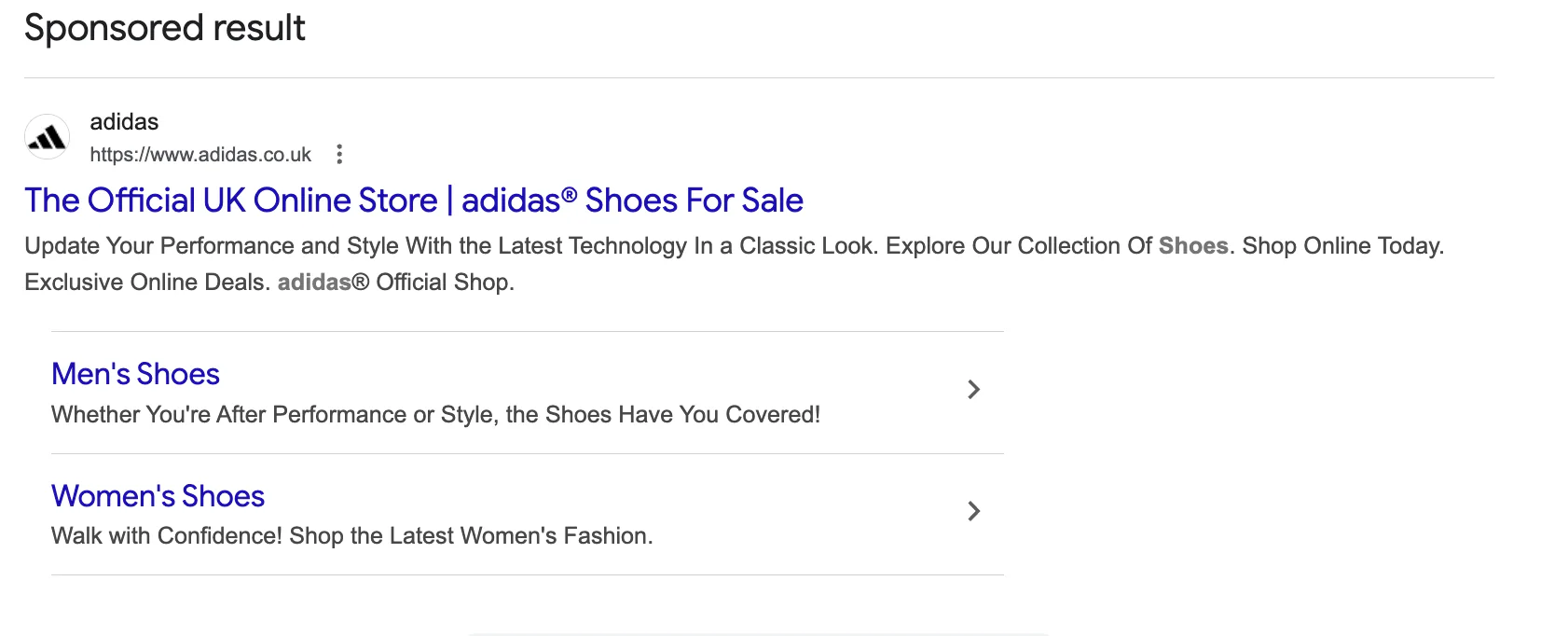
Each sitelink takes the user directly to that category page, rather than forcing them to land on the homepage and search for it themselves.
Why Sitelinks Are Important for PPC Campaigns
Sitelinks are primarily designed to make the user's journey quicker and easier.
Instead of landing on a general page and navigating through the website, the user can go straight to the exact section they are interested in.
This has a few clear benefits.
1. Higher Click-Through Rates
If someone sees a sitelink that matches what they want, they are much more likely to click.
For example, a user searching for trainers may not type "men's trainers", but if they see that sitelink in the ad, they may click it immediately.
2. Faster Customer Journey
Sitelinks reduce the number of steps someone needs to take.
Instead of:
Search → Homepage → Category → Product
They can go directly:
Search → Category → Product
3. Increased Conversions
Because users reach the relevant landing page faster, they are more likely to complete the action you want, whether that is:
A purchase
A form enquiry
A phone call
According to research by AdEvolver, adding sitelinks to ads can increase click-through rates by up to 64%, although results will vary depending on the industry and market.
How to Add a Sitelink in Google Ads
Adding sitelinks in Google Ads is actually very straightforward.
Here’s the basic process.
Step-by-Step Guide
Go to Campaigns and Ads inside Google Ads
Choose the ad you want to edit
Scroll down towards the bottom of the page
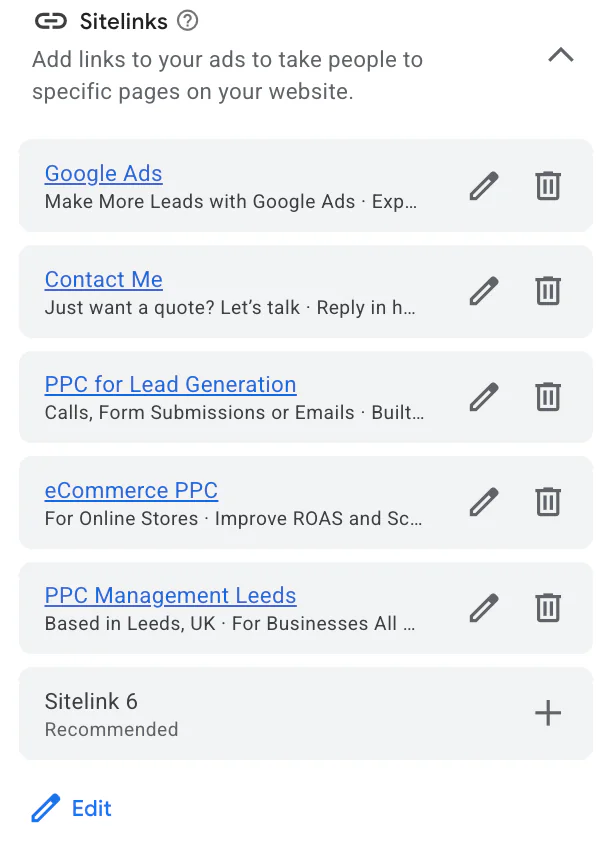
Find the section labelled Sitelinks
Add, edit, or remove sitelinks as needed
Once added, Google can display these underneath your ad in search results.
How Many Sitelinks Should You Use?
Google generally recommends having around six sitelinks available.
This doesn’t mean all six will always appear in the search results, but providing more options allows Google to show the most relevant ones depending on the user's search.
However, this is only a recommendation, not a strict requirement.
The key is that the sitelinks you add should always be relevant to the advert and the search intent.
What Should Your Sitelinks Link To?
Your sitelinks should guide users towards pages that are most likely to convert based on the search intent.
For example, if I were running a PPC advert for my services, I would include sitelinks such as:
These are all pages that relate directly to someone searching for PPC help.
What I would avoid doing is adding unrelated services like:
SEO services
If the user searched for PPC, they are far more likely to click a sitelink that continues that same journey.
The goal is always to guide the user towards the page they actually want.
Important Thing to Know About Sitelinks in Campaigns
One thing many advertisers don't realise is how sitelinks work across campaigns and ad groups.
If you change the sitelinks for an ad within a campaign, that change will usually apply across all ads within that campaign.
This means you cannot always customise sitelinks for individual ad groups inside the same campaign.
If you want completely different sitelinks, you may need to create separate campaigns.
This can be slightly frustrating if you have one campaign covering multiple products or services, but it is simply how Google Ads manages sitelink extensions to ensure consistency across ads.
Are Sitelinks Worth Using?
In short, yes.
Sitelinks are one of the simplest improvements you can make to a Google Ads campaign.
They:
Increase visibility in search results
Provide more clickable options
Help guide users to the right page faster
Can significantly improve click-through rates
Given how quick they are to implement, they should be included in almost every search campaign where relevant landing pages exist.
Conclusion
Sitelinks are a simple but powerful feature within Google Ads.
They appear underneath your main ad and allow users to click directly to specific pages on your website. This helps shorten the customer journey and makes it easier for people to find exactly what they are looking for.
When used properly, sitelinks can improve both click-through rates and conversions, making them a valuable addition to most PPC campaigns.
If you're interested in professional PPC management to grow your business, feel free to get in touch via my contact page at jonnyswiftppc.com/contact. I'd be happy to discuss how PPC can work for you.