

If you’re wondering how much budget you should allocate on Google Ads, the most effective approach is to calculate your budget based on your target keywords’ cost per click (CPC).
Step 1: Check your CPC
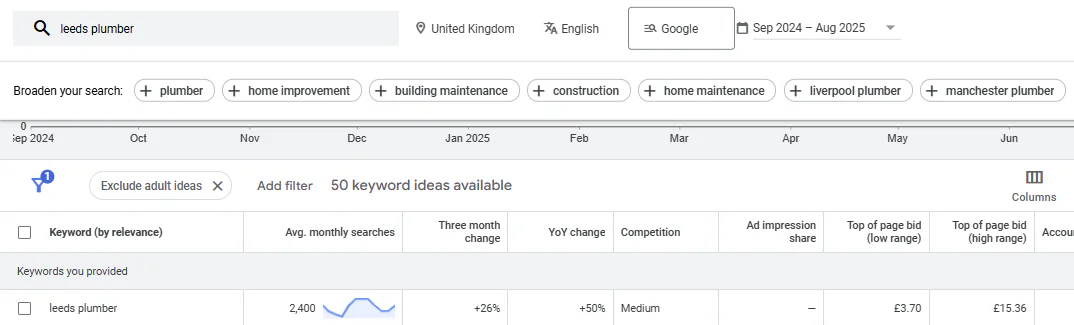
Look at the keyword planner for the keywords you want to target and find the top-of-page bid.
For example, if you want to target “Leeds plumber,” the top bid might be £15.36 per click.
Step 2: Decide how many clicks you want per day
A good starting point is 10 clicks per day. Multiply this by the CPC:
£15.36 x 10 clicks = £153.60 per day
This gives you a guideline budget.
Step 3: Adjust for your situation
You will not always spend exactly this amount.
Actual spend depends on search volume, competition, and ad performance.
If you cannot afford the full budget, start lower, but make sure you get enough clicks to learn from your ads. Getting only 1 or 2 clicks per day will not provide meaningful data.
Summary
Find the top CPC for your keywords
Multiply by your desired daily clicks
Use this as a guideline budget
Adjust based on results and what you can afford
This method ensures you are spending enough to get actionable results without guessing.
If you’d like an experts opinion or a free audit of your Google Ads account, feel free to contact me.
Check Your Budget Against Click Costs
Before settling on a budget, read what a good CPC is for Google Ads to understand what your spend could buy. My guide to making Google Ads successful explains how to connect that budget with tracking, targeting and commercial goals.