

Headlines are the key feature when it comes to Google search ads, but if you're unsure of the platform, you may be wondering, how do I change this?
In this blog post, I'm going to show you exactly how to change a headline on Google Ads. Whether you’ve spotted a typo, need to update an expired offer, or simply want to improve performance, the process itself is straightforward.
That said, while editing a headline is easy, improving results takes a bit more thought. I’ll cover both.
How to Change a Headline in Google Ads
If you're new to the platform, it can feel slightly confusing at first because of the way navigation works. Here’s exactly what to do.
Step 1: Go to Your Campaign
Log in to your Google Ads account.
Click into Campaigns
Select the campaign that contains the headline you want to change
Click into the relevant Ad Group
Once inside the ad group, you’ll typically see your keywords.
Step 2: Navigate to Ads
Now this is where people sometimes get slightly confused.
You need to go to the campaign area again, and then click on Ads
(This is under the campaign section, not “Campaigns” itself.)
You should now see your live ads alongside their performance stats such as:
Clicks
Impressions
CTR
Conversions
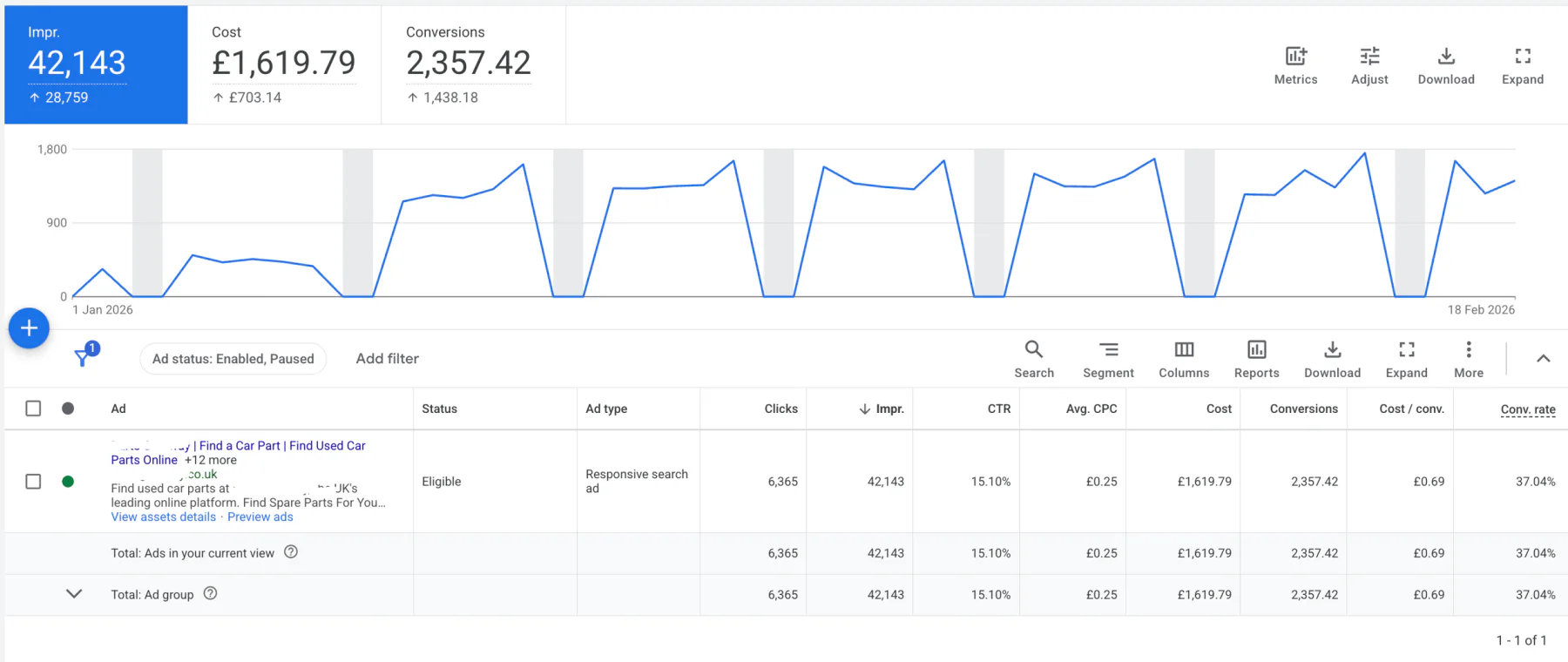
Step 3: Edit the Ad
Find the ad you want to change.
Click on the pencil icon
When you hover over it, it will say Edit
This takes you to the ad creation page.
Step 4: Change the Headline
Scroll down slightly and you’ll see the Headlines section.
With Responsive Search Ads, you can have up to 15 headlines.
From here, you can:
Add a new headline
Remove an existing one
Edit one of the current headlines
Once you’ve made your changes, scroll to the bottom and click Save Ad.
That’s it. Really easy.
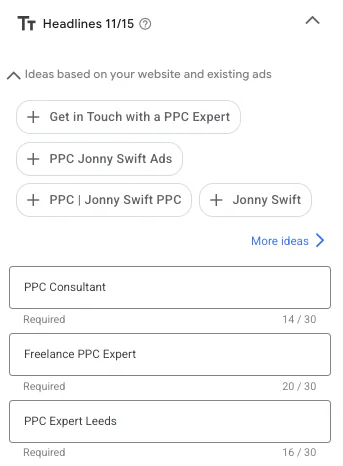
Before saving your changes, use my free Google Ads preview tool to check your character limits and review how your new headlines could look alongside different descriptions.
Why Should I Change My Headline?
Now just because you can change a headline, doesn’t mean you always should. There needs to be a reason behind it.
Here are some of the most common ones I see.
1. An Offer Has Expired
If your headline says:
“20% Off This Month”
“Free Installation Until March”
And that offer is no longer valid, it needs updating immediately. Otherwise:
You risk misleading customers
You damage trust
Your conversion rate can drop
2. There’s a Typo
It happens more often than you’d think.
Even small spelling mistakes can:
Reduce credibility
Lower trust
Impact click-through rate
Google Ads is competitive. You can’t afford sloppy copy.
3. It Breaches Advertising Guidelines
Sometimes headlines get disapproved for:
Trademark issues
Misleading claims
Restricted content
If that happens, you’ll need to edit the headline to bring it back in line with policy.
4. The Messaging Could Be Stronger
This is the big one.
Sometimes performance just isn’t where it should be.
You might need:
Clearer value propositions
Stronger calls to action
More specific benefits
Better keyword alignment
Changing a headline isn’t just about fixing mistakes. It’s about testing better messaging.
Conclusion
So that’s how to change headlines in Google Ads.
It’s a simple process:
Go to your campaign
Click into the ad group
Navigate to Ads
Click edit
Update your headlines
Save
Quick and straightforward.
But while editing headlines is easy, generating significant growth from Google Ads takes proper strategy, testing, and ongoing optimisation.
If you're interested in professional PPC management to grow your business, feel free to get in touch via my contact page at jonnyswiftppc.com/contact. I'd be happy to discuss how PPC can work for you.