

It’s a common occurrence that people have chosen the wrong keyword match type in Google Ads. For example, your broad keywords may be going too broad and picking up search terms that are not relevant.
In this blog post, I’m going to show you how to quickly change your keyword match type in Google Ads, as well as explain how each match type works so you can make better decisions going forward.
If you’ve ever looked at your search terms report and wondered why your ads are showing for completely unrelated queries, this will help you fix that.
The Difference Between Each Keyword Match Type
First, you need to understand the differences between each keyword match type in Google Ads. Choosing the right one can make a huge difference to your results.
Broad Match (Default)
Broad match is the default setting in Google Ads.
No symbols around the keyword
Shows ads for related searches, including:
Synonyms
Related topics
Misspellings
Variations in intent
Example:
Keyword: film production
Your ad could show for:
video production services
movie making company
advertising agency video
This means Google is interpreting intent quite loosely, which can be useful for volume but risky for relevance.
Phrase Match
Phrase match gives you more control while still allowing some flexibility.
Uses quotation marks: "keyword"
Ads show when the meaning of your keyword is included in the search
Example:
Keyword: "roofing services"
Your ad may show for:
local roofing services near me
affordable roofing services
emergency roofing services
The keyword meaning must be present, even if other words are added before or after.
Exact Match
Exact match is the most controlled option, but still not as strict as it used to be.
Uses square brackets: [keyword]
Ads show for searches with the same meaning or intent
Example:
Keyword: [buy a car]
Your ad may show for:
car for sale
buy automobile
purchase a car
Google will still include close variations, but the intent must closely match your keyword.
Why Match Type Matters
It’s important to know which keyword match type is best for your business or industry.
In my experience:
Broad match can work for ecommerce or large budgets
Phrase match is a strong middle ground
Exact match is best for tight control and lead generation
If you’re unsure, it’s always worth reviewing performance and testing.
If you’d like me to take a look at your account, you can find my contact details at the end of this post.
How to Change Match Types the Easy Way
Changing keyword match types in Google Ads is actually very straightforward.
Step-by-Step Process
Go to Campaigns
Click Audiences, Keywords and Content
Select Keywords
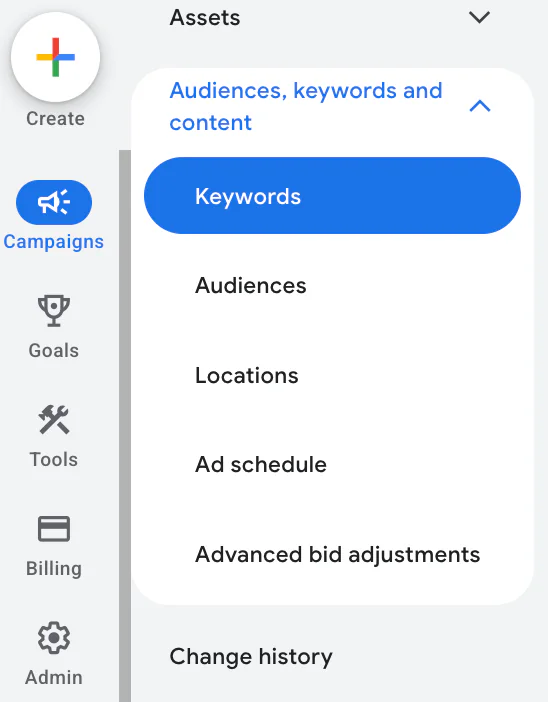
Here, you’ll see a full list of your keywords along with their match types.
You can:
Filter by campaign or ad group
View performance by match type
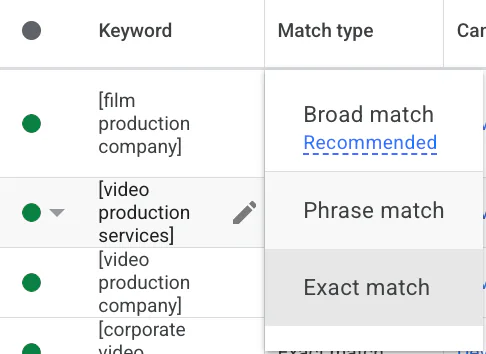
Editing a Single Keyword
The easiest way:
Click on the match type next to the keyword
Select the new match type
Save
That’s it.
Changing Match Types in Bulk
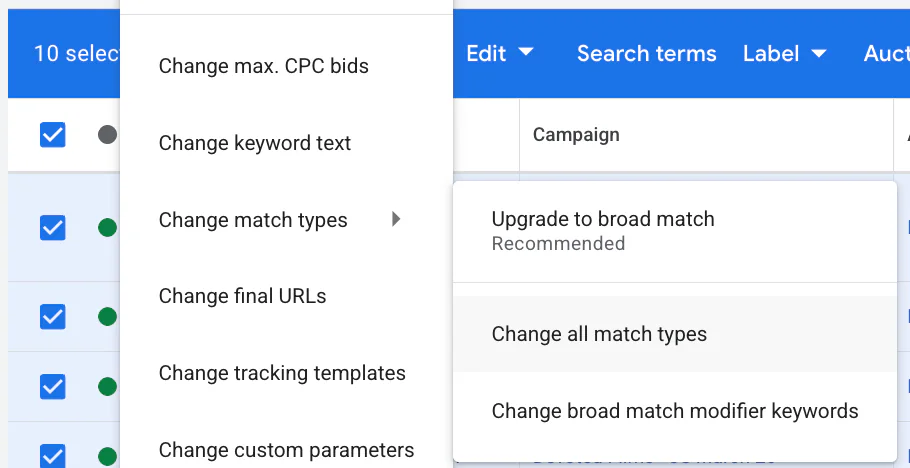
If you want to make changes at scale:
Select multiple keywords
Click Edit
Choose Change match types
Select your desired match type
This is especially useful when restructuring campaigns or tightening targeting.
Important Note on Broad Match
Broad match is often recommended by Google, but it isn’t necessary for every industry.
In particular:
Lead generation campaigns can suffer
Budgets can be wasted quickly
Search terms can become too irrelevant
I generally recommend testing it carefully rather than relying on it completely.
How to Change Negative Keyword Match Types
Negative keywords work slightly differently.
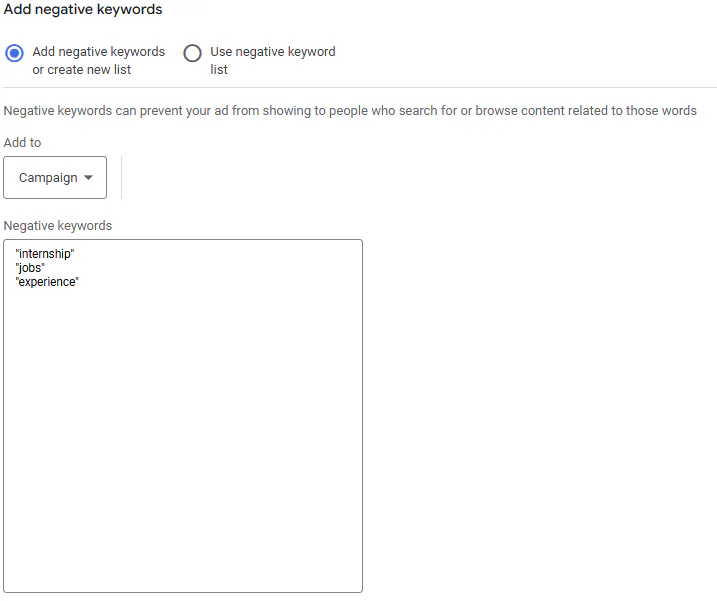
Although the setup looks similar, you cannot directly change the match type of an existing negative keyword.
What You Need to Do Instead
Delete the existing negative keyword
Re-add it with the correct match type
Negative Keyword Formats
Broad match: keyword
Phrase match: "keyword"
Exact match: [keyword]
So if you want to change a negative keyword from broad to phrase, you must remove it and re-enter it using quotation marks.
It’s a small extra step, but important to get right if you’re refining your targeting.
Common Mistakes to Avoid
When changing keyword match types, I often see a few common issues:
Switching everything to broad match too quickly
Not reviewing search terms after changes
Forgetting to update negative keywords
Making bulk changes without testing
A better approach is:
Test gradually
Monitor performance
Adjust based on real data
Conclusion
Changing keyword match type in Google Ads is simple, but the impact can be significant.
To recap:
Broad match offers reach but less control
Phrase match balances control and flexibility
Exact match gives the most precision
Negative keywords need to be re-added to change match type
The key is choosing the right approach for your business goals and budget, rather than relying on defaults.
If you’re interested in professional PPC management to grow your business, feel free to get in touch via my contact page at jonnyswiftppc.com/contact. I’d be happy to discuss how PPC can work for you.