

You might have had a Google Ads campaign running, but it is not performing as intended. Maybe leads are down, cost per conversion has increased, or you are simply not seeing the return you expected.
When that happens, many business owners start searching for how to end Google Ads campaign quickly.
In some cases, ending a campaign is the right move. In others, it simply needs fixing. If performance is the issue, you can get in contact with a Google Ads specialist like myself to review and improve it. But if you just want to pause a campaign, the process is actually very straightforward.
In this guide, I will walk you through exactly how to end a Google Ads campaign properly and explain when it makes sense to do it.
How to End Google Ads Campaign
It is really simple.
All you need to do is:
Log in to your Google Ads account
Go to the Campaigns section
You will see a list of your active and inactive campaigns
In this section, you will notice different status icons next to each campaign:
A green dot means the campaign is live
A pause icon means it is temporarily paused
An X or greyed-out icon usually means it has been removed
To end a campaign:
Find the campaign you want to stop
Click on the status icon next to it
Choose either Pause or Remove
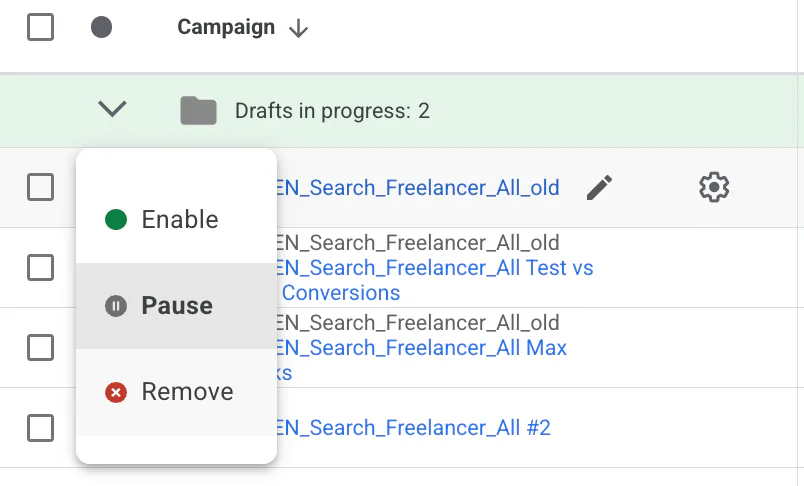
Pause vs Remove: Which Should You Choose?
This is important.
Pause
Pausing a campaign temporarily stops ads from running. You can turn it back on at any time. All historical data remains intact.
Remove
Removing a campaign permanently deletes it from active use. You will still be able to see historical data, but you cannot reactivate it.
In my experience, I recommend pausing rather than removing. You may want to revisit that campaign in the future, especially if seasonality or budget changes.
Why Would You Want to End a Campaign?
There are several legitimate reasons for stopping a campaign. It is not always about failure.
1. You Are Short on Budget
If cash flow is tight or you need to prioritise spend elsewhere, pausing a campaign can protect your overall marketing budget.
That said, before turning it off completely, it is worth checking:
Is it driving assisted conversions?
Is it supporting branded search?
Could it run at a lower daily budget instead?
Sometimes reducing budget is better than ending entirely.
2. It Is Not Performing as Intended
This is the most common reason.
If:
Cost per lead is too high
ROAS is below target
Conversions have dropped
Traffic quality is poor
Then yes, you may feel like ending the campaign.
However, performance issues are often fixable. It could be:
Weak keyword targeting
Poor conversion tracking
Low Quality Score
Weak landing pages
Incorrect bidding strategy
Before switching it off permanently, I would recommend a proper account review. A Google Ads specialist like myself can identify what is actually causing the issue and whether it can be improved profitably.
3. The Offer or Deal Is No Longer Available
If you were running:
A limited-time promotion
A seasonal offer
A clearance campaign
And the deal has ended, then it makes sense to pause or remove the campaign.
Just make sure no ads are still live promoting outdated offers. That can damage trust quickly.
4. It Is a Holiday Period or Demand Has Dropped
Some industries experience seasonal dips.
For example:
B2B services around Christmas
Home improvement during winter
Education outside enrolment windows
If search demand lowers significantly, pausing can prevent wasted spend.
That said, it is worth checking historical data in your account before assuming demand has dropped. Sometimes competition changes rather than demand.
Should You End It or Optimise It?
This is the bigger question.
Ending a campaign is easy. Optimising it takes experience.
Before stopping a campaign entirely, consider:
Has it had enough data to learn?
Is tracking set up correctly?
Are you bidding based on real conversion data?
Are margins realistic?
I have seen many campaigns labelled as “not working” that were actually just mismanaged.
If you are unsure whether to end or fix it, that is where professional input can make a big difference.
Conclusion
It is really simple how to end a Google Ads campaign.
All you need to do is go to your campaign section, click on the status icon, and choose pause or remove. In most cases, I recommend pausing in case you want to reactivate it later.
However, if your campaign is not performing as intended, it does not always mean it should be shut down. Often, it simply needs proper optimisation and strategic adjustments.
If you're interested in professional PPC management to grow your business, feel free to get in touch via my contact page at jonnyswiftppc.com/contact. I'd be happy to discuss how PPC can work for you.