

You might already be spending money on platforms like Google Ads or Meta Ads, but not getting the results you expected.
That can be frustrating. You’re investing budget every month, yet conversions aren’t coming in consistently or the return just isn’t where it should be.
If that sounds familiar, you’re not alone. Many businesses run Google Ads campaigns without fully understanding the factors that influence performance.
In this post, I’m going to walk through several practical ways to improve Google Ads performance. These are changes that can often make a noticeable difference when applied correctly.
Some are quick wins, while others involve refining how your account is structured and managed.
1. Consider Hiring a PPC Freelancer or Agency
One of the biggest mistakes businesses make is assuming Google Ads is something you can quickly learn and manage in spare time.
In reality, there are a lot of moving parts.
Things like:
Keyword targeting
Bidding strategies
Campaign structure
Ad copy testing
Search term optimisation
Budget allocation
All of these need ongoing attention.
Even though I’ll outline several ways to improve Google Ads performance in this article, I strongly recommend considering a PPC freelancer or agency.
The reason is simple: experience speeds things up.
Someone who manages accounts daily can usually spot issues much faster and implement improvements without the trial-and-error stage.
Many freelancers and agencies offer options such as:
Full ongoing account management
One-off Google Ads audits
Quick account fixes and optimisation
This means you can get your campaigns moving in the right direction without spending weeks trying to learn everything yourself.
As a PPC freelancer, I work with businesses that want to improve performance and make their ad spend more efficient. If you'd like someone to review your account, feel free to get in touch through my website.
2. Review Keywords and Search Terms Regularly
Keywords and search terms are one of the biggest areas where businesses waste money in Google Ads.
If you haven't checked your search terms report recently, there's a good chance you're paying for irrelevant clicks.
To review this:
Go to:
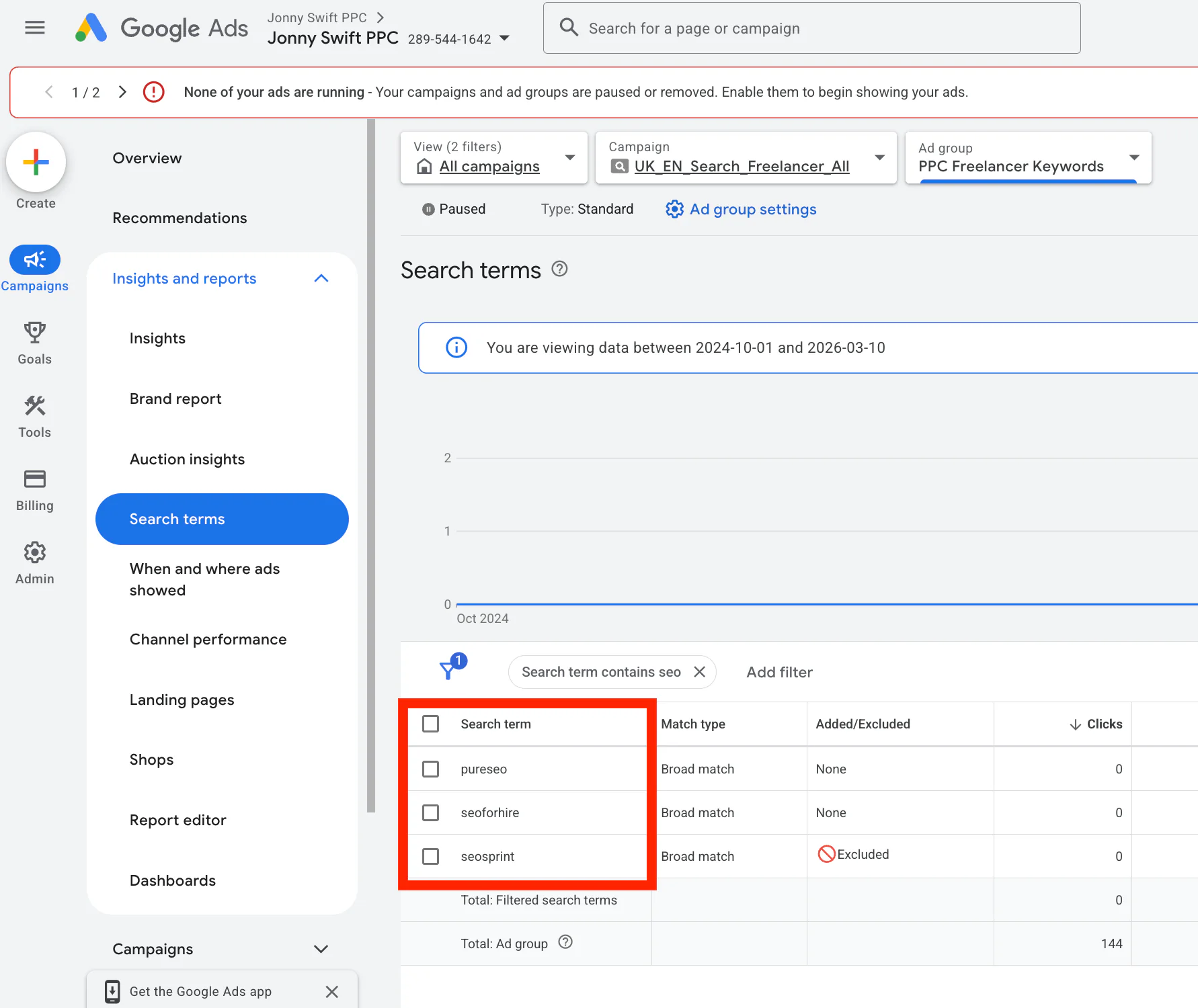
Campaigns → Insights and Reports → Search Terms
Here you’ll see the actual queries people typed into Google before clicking your ad.
You’ll often find searches that have little or nothing to do with your service.
For example, I once had a Google Ads campaign for PPC freelancer services. However, search terms related to SEO started appearing in the report.
Because those searches weren’t relevant, I added "SEO" as a negative keyword to prevent those queries from triggering my ads.
Negative keywords are extremely powerful.
For example:
If you sell women’s shoes, you could add:
"men's"
"men"
"mens"
as negative keywords to stop your ads appearing for searches related to men’s footwear.
Doing this regularly helps:
Reduce wasted spend
Improve click quality
Increase conversion rates
3. Optimise Your Bidding Strategy
Bidding is another key factor affecting Google Ads performance.
In many accounts I review, businesses are either:
bidding far too aggressively
or restricting bids too much
Google uses your bidding targets to determine how much it should aim to pay for a conversion.
The higher this target is, the more freedom Google has to increase bids.
In some cases this can lead to:
rising costs per click
budgets being spent quickly
fewer overall conversions
My approach for many accounts is to gradually reduce bidding targets where possible, while continuing to optimise the campaign.
This helps Google aim for more efficient conversions rather than expensive ones.
The goal is simple:
Get more conversions for the same budget.
4. Restructure Your Campaigns and Budgets
Not all campaigns perform equally.
If you run multiple campaigns, you’ll usually find that some produce significantly better results than others.
Unless there is a strategic reason to push a specific product or service, it often makes sense to shift budget toward the campaigns that perform best.
This can help you:
reduce spend on low-performing areas
scale campaigns that generate conversions
improve overall account efficiency
However, this always depends on the type of business you run.
Some products might generate fewer conversions but have much higher value per sale.
For example:
high-ticket services
specialised products
B2B offerings
So decisions should always be made based on both conversion data and revenue value.
5. Adjust Your Ad Schedule
Ad scheduling is especially important for certain types of businesses.
For example, with B2B companies, weekends often perform poorly.
People browsing on Saturdays and Sundays are often in a more informational stage rather than a commercial one. They might be researching rather than ready to buy.
Because of this, you might see:
fewer conversions
lower intent traffic
wasted budget
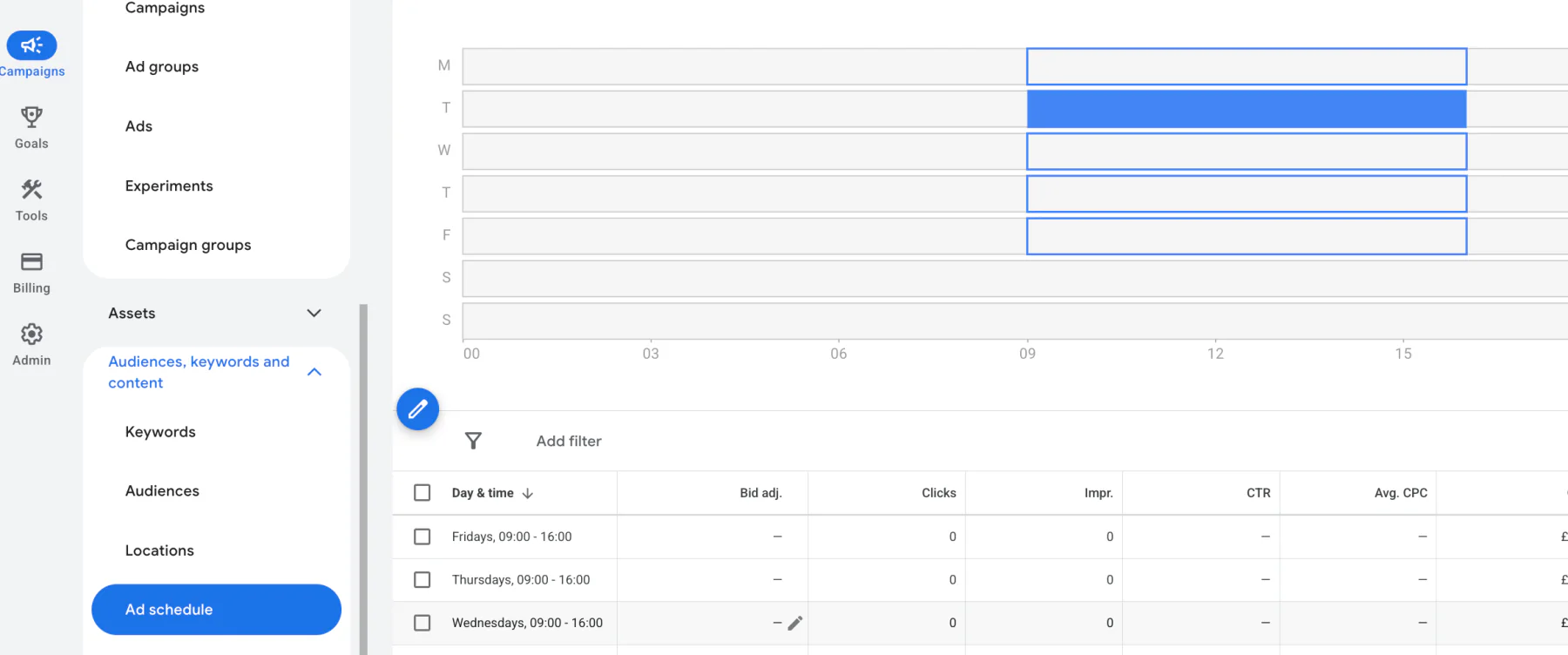
You can adjust this in your account by going to:
Campaigns → Audiences → Ad Schedule
From here, you can control exactly when your ads run.
More advanced strategies include:
bidding higher on strong days
reducing bids during weaker periods
However, these approaches usually work best when you have a good amount of conversion data.
Other Smaller Ways to Improve Google Ads Performance
Improve Your Headlines
Your headlines play a big role in click-through rate.
If you're a local business, it’s often a good idea to include your location.
For example:
"Plumber in Leeds"
"Leeds Emergency Electrician"
This signals to users that you're local rather than a national company far away.
Use High-Quality Images
If you're running campaigns that support images, make sure they are visually strong.
Good imagery can:
improve click-through rates
attract attention in crowded search results
help differentiate you from competitors
Always choose images that clearly relate to the product or service you offer.
Add Site Links, Callouts and Promotions
Ad extensions are often underused, but they can make a noticeable difference.
Examples include:
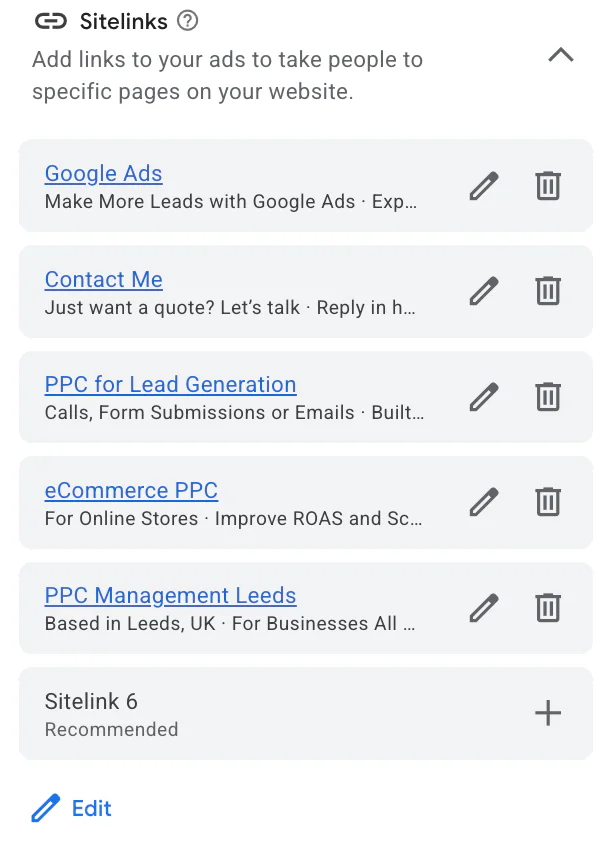
Sitelinks
Callouts
Promotion extensions
These help by:
increasing the size of your ad
providing extra information
giving users more options to click
For example, sitelinks can direct users to:
service pages
pricing pages
special offers
contact pages
Always make the most of these features.
Refine Your Location Targeting
Location targeting is another simple but effective optimisation.
If your business serves a specific area, make sure your campaigns reflect that.
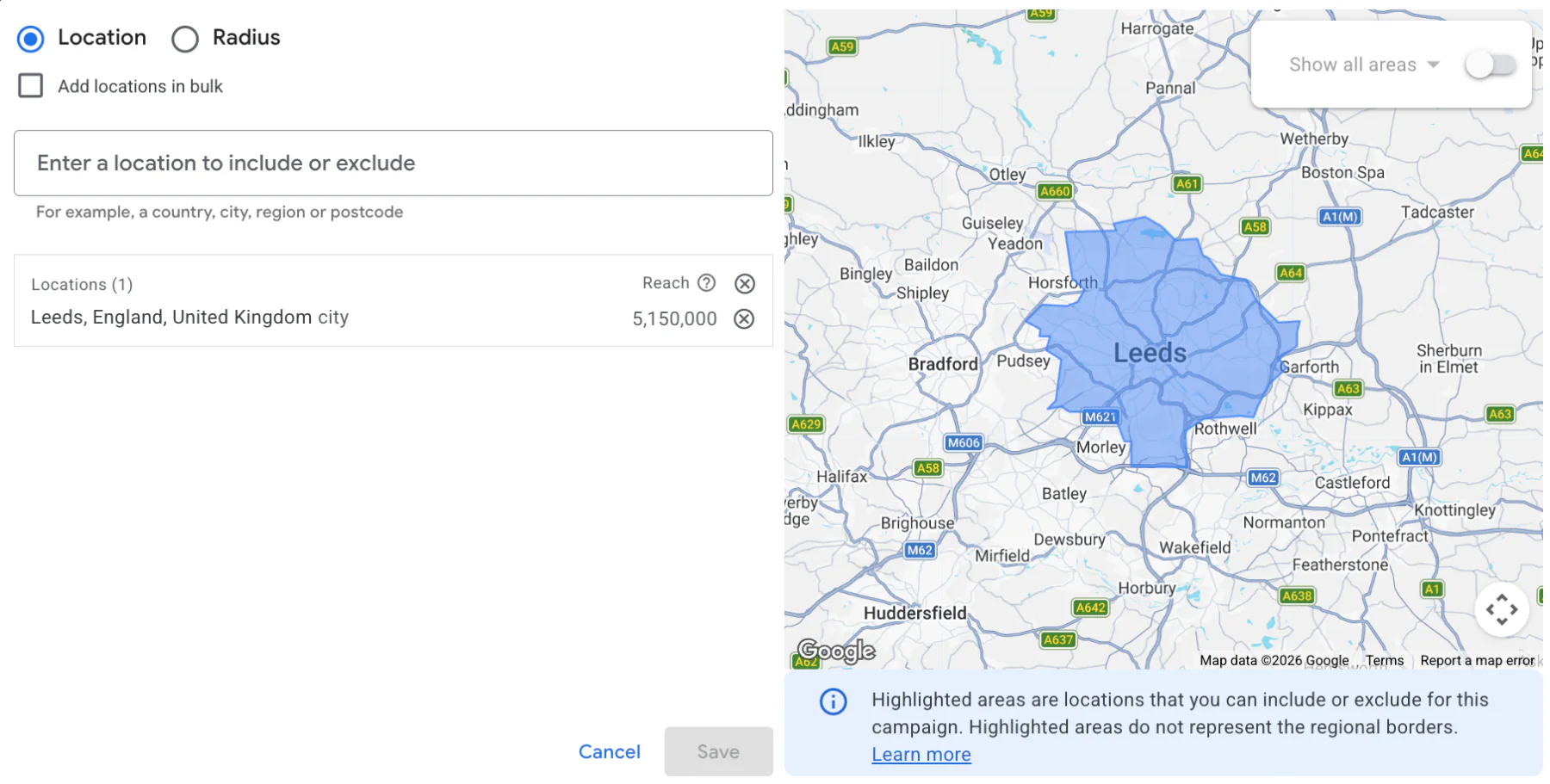
For example, if I primarily work with businesses in Leeds, I can target that location specifically in the campaign settings.
This avoids unnecessary clicks from people much further away, such as London, who are unlikely to use my services.
To adjust this, go to:
Campaign Settings → Locations
Then refine the areas where your ads appear.
Targeting the right geography can significantly improve the quality of your traffic.
Conclusion
Improving Google Ads performance usually comes down to a combination of small optimisations and strategic changes.
Some of the most impactful areas to review include:
hiring experienced help
analysing search terms and negative keywords
adjusting bidding strategies
restructuring campaigns and budgets
refining ad scheduling
improving ads and extensions
targeting the right locations
Every account is different, and what works best will always depend on your business, your industry, and your goals.
These are some of the main ways you can improve Google Ads performance, but there are many other techniques that can be applied depending on the situation.
If you'd like someone to take a look at your account and identify opportunities for improvement, feel free to get in touch via my contact page at jonnyswiftppc.com/contact. I'd be happy to discuss how Google Ads could work better for your business.