

Re-indexing on Google helps you push your content live much quicker than waiting for Google to automatically find it through your sitemap. Instead of sitting back and hoping Google gets around to it, you can actively tell Google to check your page now.
In this guide, I’ll show you exactly how to re-index a page on Google using Google Search Console, step by step.
If you are interested in knowing how long it takes for it to reindex without support, check out my blog post on the matter.
How to Re-Index a Page on Google
Step 1: Set Up Google Search Console
The first thing you need is Google Search Console. It’s completely free to set up, and every business should have it.
Google Search Console shows you how your website is appearing on Google. When you create or update a page, this is how Google discovers it and uploads it into its own system.
If you don’t already have Search Console set up, that should be your first priority before trying to re-index anything.
Step 2: Inspect the URL
Once you’re inside Google Search Console, copy the full URL of the page you want to re-index.
At the top of the dashboard, you’ll see a search bar that says “Inspect any URL in website name”. Paste your URL into that bar and press Enter.

Step 3: Request Indexing
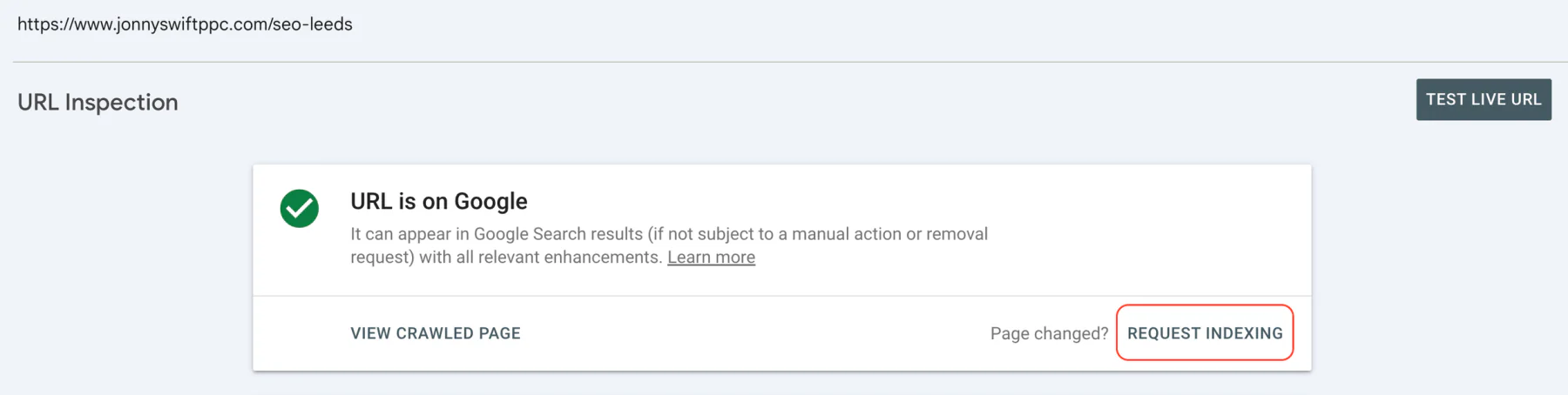
After pressing Enter, you’ll be taken to the URL Inspection screen.
Look for the option that says “Request indexing” and click it. Google will then start testing whether the live URL can be indexed.
After a few seconds, you should see confirmation that your request has been submitted. Your page is now queued to be re-indexed on Google.
Important Re-Indexing Limits
Google does place a limit on how many URLs you can request indexing for each day. This is usually around 10 to 15 URLs per day to prevent abuse.
If you have a lot of pages that need re-indexing, be mindful of this limit and spread your requests out.
Final Thoughts
Re-indexing pages on Google is really easy, and it’s a great way to get your content appearing on Google much faster than waiting for it to be picked up through your sitemap.
If you’re looking for help with your SEO, I help businesses worldwide grow organic traffic on Google. Book a 30-minute consultation, and I’d love to talk about you and your business.