

If you run Google Ads campaigns regularly, you’ve probably come across the yellow “Limited by Target” status at some point.
At first glance, it looks serious. A warning inside Google Ads usually makes advertisers think something is wrong with the campaign. In reality, though, it’s normally not something to panic about.
In most cases, “Limited by Target” simply means Google Ads is struggling to spend your full daily budget while staying within the targets you’ve set, such as your target CPA or target ROAS.
This blog post explains exactly what “Limited by Target” means, why it happens, and what you can do to prevent it.

What Does “Limited by Target” Actually Mean?
“Limited by Target” is a status that appears when Google Ads believes your bidding targets are too restrictive for the budget and traffic available.
This usually happens when using automated bidding strategies like:
Target CPA (Cost Per Acquisition)
Target ROAS (Return on Ad Spend)
Google is essentially saying:
“I can’t find enough opportunities that meet your targets while also spending your budget.”
So if your campaign has:
A high daily budget
A very strict target CPA
Or an aggressive target ROAS
Google may struggle to enter enough auctions to spend what you’ve allocated.
That’s why the campaign becomes “Limited by Target”.
Why It Happens Most of the Time
In my experience, around 99% of the time this happens because:
Your target CPA is too low
Your target ROAS is too high
Your daily budget is larger than the available traffic can realistically spend
For example:
If you tell Google:
“I only want leads at £5 each”
Or “I need an 800% ROAS”
Google becomes extremely selective with auctions.
As a result, your ads may appear less often because the system is trying to protect your targets.
It’s Usually Not a Serious Problem
The important thing to understand is this:
“Limited by Target” does not mean your campaign is broken.
It simply means Google probably won’t spend your full budget.
In some situations, that’s completely fine.
If your campaign is profitable and generating good quality leads or sales, there may be no reason to change anything at all.
A lot of advertisers panic when they see warning messages inside Google Ads, but not every warning requires action.
Sometimes it’s simply informational.
How to Fix “Limited by Target”
If you do want to remove the warning and allow Google to spend more budget, there are a few options.
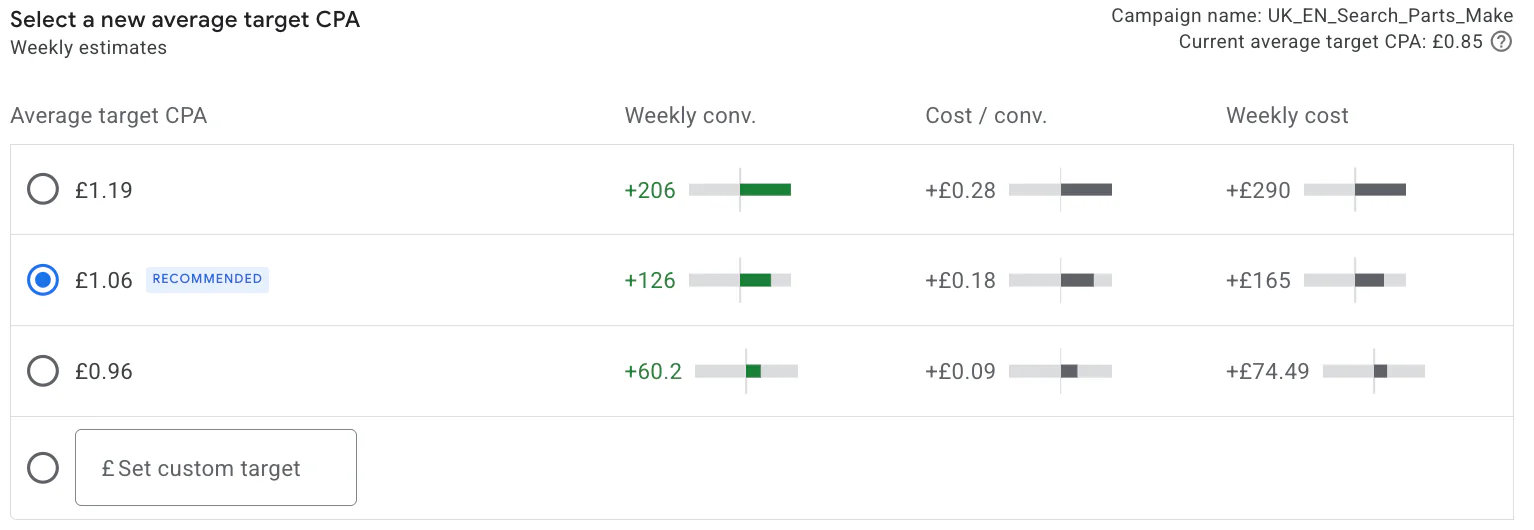
1. Relax Your Target CPA or ROAS
This is the fix Google Ads will usually recommend directly inside the platform.
For example:
Increase your target CPA
Decrease your target ROAS target
This tells Google it can bid more aggressively and enter more auctions.
As a result:
Impressions increase
Click volume increases
Spend usually increases too
The trade-off is that efficiency may reduce slightly.
2. Lower Your Daily Budget
This is the option Google doesn’t usually recommend, because naturally Google wants campaigns spending more.
But realistically, if your campaign cannot spend £200/day efficiently, reducing the budget to £100/day may actually improve stability.
This can help align:
Budget
Search volume
Bidding targets
More realistically.
3. Add More Keywords or Ad Groups
Another way to solve “Limited by Target” is to expand the campaign itself.
You can do this by:
Adding more keywords
Creating additional ad groups
Expanding match types carefully
Covering more search intent
This gives Google more opportunities to enter auctions and spend budget while still working within your target CPA or ROAS goals.
What Happens After You Fix It?
Interestingly, once you remove “Limited by Target”, you’ll often see another status appear instead:
“Limited by Budget”
This is extremely common.
At that point, Google is basically saying:
“Your campaign could spend more if you increased budget.”
So the cycle continues.
Google Ads is constantly trying to maximise spend opportunities, which is why warning messages are very common inside the platform.
If you’ve ever seen “Limited by Budget”, I actually have a separate blog post explaining exactly what that means and whether you should increase your budget or not.
Should You Always Fix “Limited by Target”?
Not necessarily.
Before making changes, ask yourself:
Is the campaign profitable?
Are leads or sales coming through consistently?
Is the CPA acceptable?
Is the ROAS strong?
If the campaign is already performing well, forcing more spend may actually reduce efficiency.
In many cases, leaving the campaign alone is the better decision.
The goal shouldn’t just be spending budget.
The goal should be profitability.
Final Thoughts
“Limited by Target” in Google Ads sounds more alarming than it really is.
Most of the time, it simply means your target CPA or ROAS is too restrictive for the available traffic and budget.
The main things to remember are:
It’s usually not a major issue
Google Ads simply can’t spend your full budget efficiently
You can fix it by loosening targets, reducing budget, or expanding the campaign
More spend does not always mean better results
Like many things in Google Ads, context matters more than the warning itself.
If you're interested in professional PPC management to grow your business, feel free to get in touch via my contact page at Jonny Swift PPC. I'd be happy to discuss how PPC can work for you.