

If you’re running Google Ads for a lead generation business but your phone number isn’t visible in your ads, you could be missing out on easy conversions.
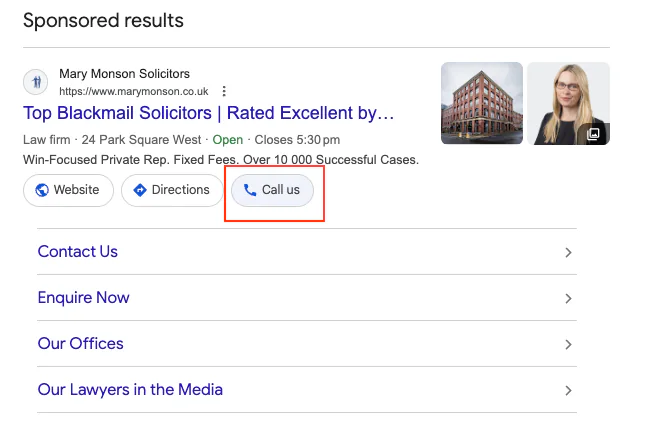
A call extension in Google Ads gives potential customers another way to contact you instantly. Instead of filling in a form or sending an email, they can simply tap and call your business directly.
In this guide, I’ll show you exactly how to add a call extension in Google Ads, where to find it inside the platform, and when it actually makes sense to use one.
I’ll also explain why call extensions work extremely well for lead generation businesses but may not be ideal for e-commerce brands.
Why You Should Use a Call Extension
For lead generation businesses, I strongly recommend adding a call extension.
It gives potential customers a second conversion option alongside your website forms.
Some people simply prefer speaking to someone immediately rather than filling in a form and waiting for a reply.
In my experience managing Google Ads campaigns and within my own business, adding a call option increased conversion rates by roughly 40% compared to relying only on forms or email.
Why it works well:
People can contact you instantly
It reduces friction in the buying process
It captures high-intent prospects ready to talk
Mobile users can call with one tap
For service-based businesses like:
plumbers
electricians
PPC agencies
consultants
legal services
…a phone call is often the fastest path to a new customer.
When You Should NOT Use a Call Extension
Call extensions are not always the right choice.
If you're running an e-commerce business, I often recommend avoiding them unless your team actively takes orders over the phone.
Here’s why.
Many people will click a call extension simply to:
ask general questions
complain about an order
ask for support
make enquiries your website already answers
For most e-commerce stores, your website should do the majority of the selling and answering.
There’s also another important factor: cost.
A click on a call extension can still cost money, just like a normal ad click.
If those calls are not generating revenue, you may simply be wasting part of your advertising budget.
So for e-commerce brands, removing call extensions can often help keep spend focused on actual purchase intent.
How to Add a Call Extension in Google Ads
Adding a call extension is actually very straightforward once you know where to find it.
Here is the exact process.
Step 1: Go to Your Campaign Ads
Inside Google Ads:
Go to Campaigns
Click Ads
You will now see all the ads currently running in that campaign.
Step 2: Edit Your Ad
Find the ad you want to add the call extension to.
Then:
Click the pencil icon (Edit)
Scroll down the page.
At the bottom, you will see a section called:
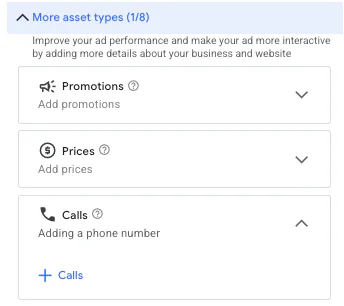
More asset types
Next to this you will see a number out of eight.
Step 3: Find the Call Asset
Within the asset types, look for Calls.
Two things can happen here:
If it shows blank, you do not currently have a call extension added.
If there is a number displayed, a call extension already exists.
To add one:
Click + Calls
Step 4: Add Your Phone Number
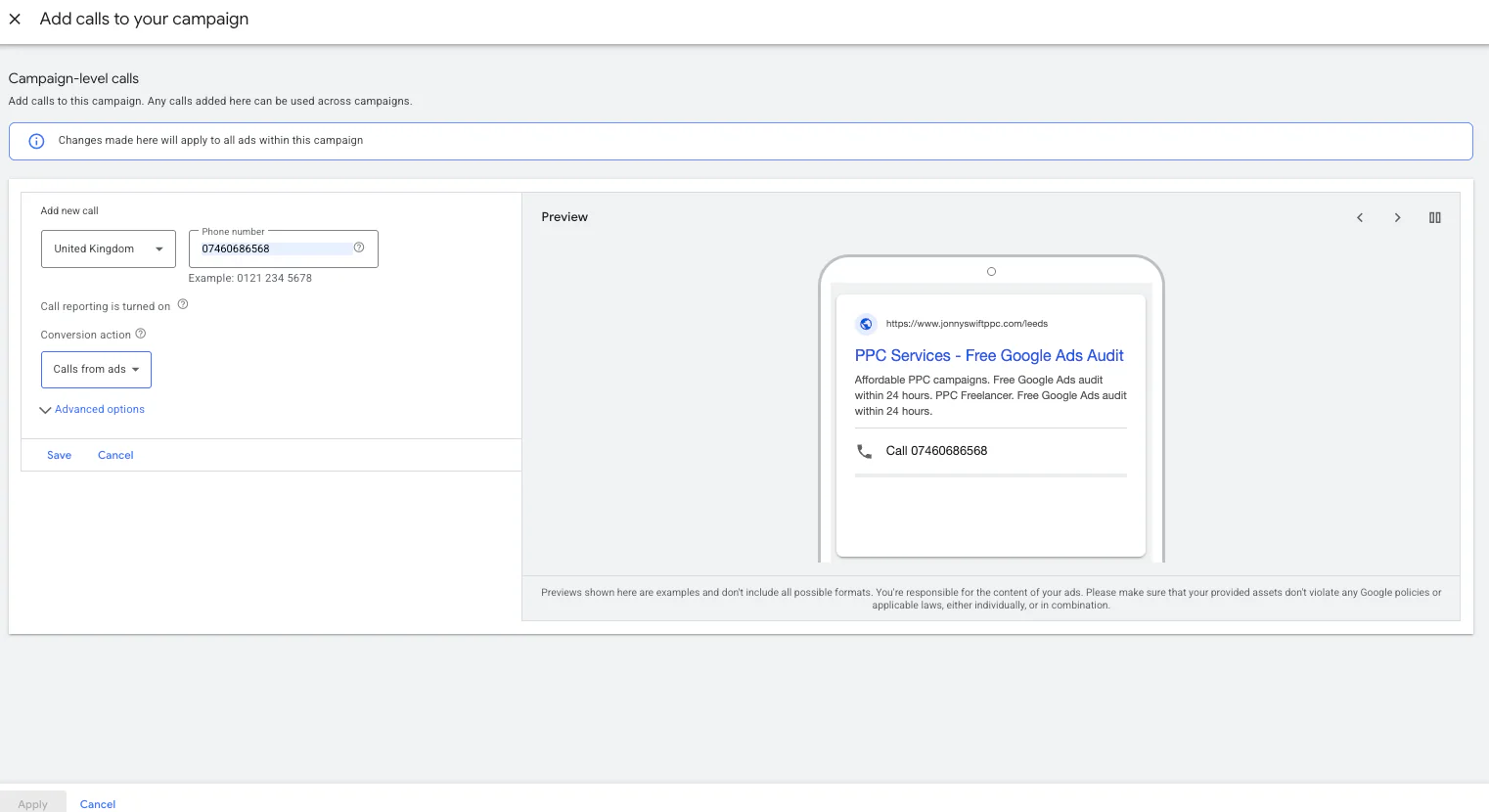
Once inside the call asset settings, simply add:
Your phone number
A conversion action
Your call schedule
The setup is very simple.
However, there are two settings I always recommend paying attention to.
Set Up Conversion Tracking
If you haven't already created a call conversion action, I strongly recommend doing this.
This allows Google Ads to track:
calls generated from your ads
which campaigns generate the most calls
which keywords lead to phone enquiries
Without this, you’re missing valuable performance data.
Set the Correct Call Hours
You should also control when your phone number appears.
For lead generation businesses, I recommend showing the call extension only during your office hours.
Otherwise, people may call at any time of day.
For example:
9am – 5pm
Monday to Friday
Final Step: Apply and Save
Once you’ve entered your phone number and settings:
Click Apply
Save your ad again.
Your call extension will now be attached to the ad.
If you're running Performance Max campaigns, the call asset is found in the exact same place within the asset section.
Final Thoughts
Adding a call extension in Google Ads is a simple change that can significantly improve results for lead generation businesses.
It provides an extra conversion path and allows high-intent prospects to contact you instantly.
To summarise:
Call extensions work extremely well for lead generation campaigns
They can increase conversion rates by offering direct phone contact
E-commerce businesses should be cautious unless they actively take orders by phone
Always set conversion tracking and call schedules
Small improvements like this can make a noticeable difference to your campaign performance.
If you're interested in professional PPC management to grow your business, feel free to get in touch via my contact page at jonnyswiftppc.com/contact. I'd be happy to discuss how PPC can work for you.