

If you're working with a freelancer, consultant, or agency, one of the first things you’ll likely be asked for is your Google Ads ID.
I get asked for this all the time when taking on new clients. Whether you're trying to grant access or simply understand your account better, knowing where to find your Google Ads ID is essential.
In this guide, I’ll show you exactly where to find your Google Ads account ID, what it looks like, and what to do if you can’t log in.
Where to Find Your Google Ads ID
Finding your Google Ads ID is actually very straightforward once you know where to look.
If you're logged into your Google Ads account:
Step-by-step:
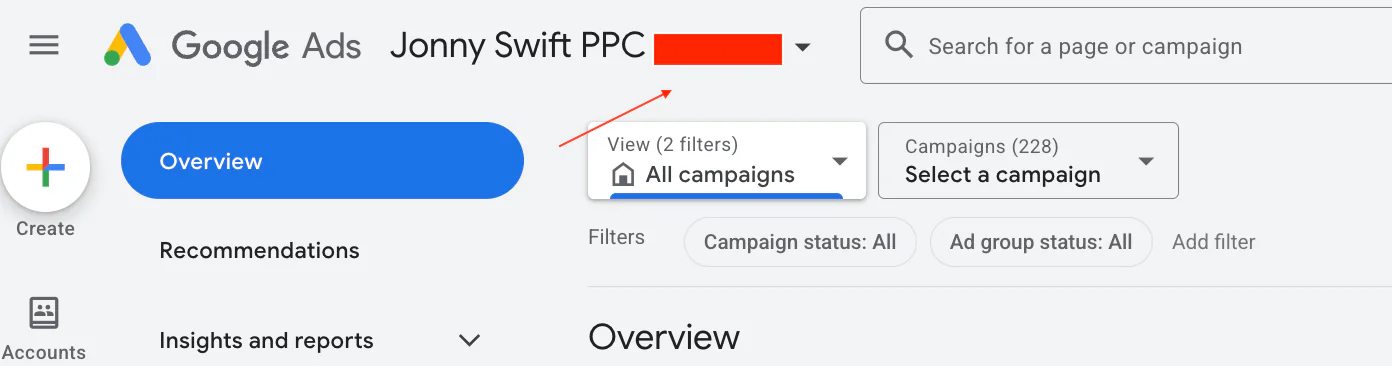
Go to your Google Ads dashboard
Look at the top left and top right corner of the screen
You’ll see your ID displayed in this format:
XXX-XXX-XXXX
It’s always visible when you're inside the account, so you don’t need to dig through settings or menus.
This number is your Google Ads Customer ID, and it’s unique to your account.
What Can You Use Your Google Ads ID For?
Your Google Ads ID isn’t just a random number, it’s actually quite important.
Here are the main reasons you might need it:
1. Granting access to an agency or freelancer
If you’re working with someone like myself, they’ll need your ID to request access to your account.
This is done through a Google Ads manager account, where they link to your account using your Customer ID.
2. Account verification
If you’ve got multiple Google Ads accounts, things can get messy.
Your ID helps you:
Identify the correct account
Avoid confusion between duplicates
Keep everything organised
3. Staying compliant with Google’s policies
Google generally expects businesses to have one account per website.
If you accidentally create duplicates, it can cause issues, including potential account suspensions.
Using your Google Ads ID helps you confirm which account is the main one, so you can safely remove any duplicates.
Personal ID vs Account ID: What’s the Difference?
This is where some people get confused.
There isn’t really a separate “personal ID” in Google Ads in the way people think.
What most people are referring to is:
Customer ID → The main account ID (XXX-XXX-XXXX)
Payments profile ID → Used for billing and invoices
In most cases, when someone asks for your Google Ads ID, they mean your Customer ID.
Common Mistakes to Avoid
When sharing or looking for your Google Ads ID, I often see a few common issues:
Sending the wrong number (like a payments profile ID instead)
Looking in settings when it’s already visible at the top
Creating a new account instead of recovering the existing one
Running multiple accounts for the same business
If you're unsure, it’s always better to double-check before sharing access.
Final Thoughts
Finding your Google Ads ID is quick once you know where to look, and it’s something you’ll likely need at some point, especially if you're working with a PPC professional.
To recap:
You can find it at the top of your Google Ads dashboard
It follows the format XXX-XXX-XXXX
If you can’t log in, check your emails
It’s essential for granting access and managing accounts properly
If you're interested in professional PPC management to grow your business, feel free to get in touch via my contact page at jonnyswiftppc.com/contact. I’d be happy to discuss how PPC can work for you.