

As a PPC freelancer, I get asked questions all the time by business owners and even other Google Ads freelancers. One of the questions that comes up regularly is:
"Is adding too many keywords bad for Google Ads?"
I've managed hundreds of Google Ads campaigns over the years, and the answer isn't quite as straightforward as yes or no.
In this article, I'll explain exactly how I approach keywords, why your budget plays a huge role, and how to decide whether you have too many keywords in your own Google Ads account.
How Do Keywords Actually Work?
Before answering whether adding too many keywords is a bad idea, it's important to understand what keywords actually do.
A common misconception is that keywords and search terms are the same thing. They aren't.
Think of keywords as trigger points. They tell Google which types of searches you're interested in showing ads for. The actual search that a user types into Google is known as the search term.
Google then decides whether one of your keywords is relevant enough to trigger your advert for that search.
There are different keyword match types, including:
Phrase Match
Broad Match
I'm not going to cover match types in this article, but it's useful to understand that keywords are simply signals to Google rather than the exact searches people type.
Is Adding Too Many Keywords Bad?
My answer is...
It depends on the size of your Google Ads account and your available budget.
One of the biggest mistakes I see is businesses creating huge numbers of campaigns, ad groups and keywords despite having a relatively small advertising budget.
The problem isn't necessarily having lots of keywords.
The problem is not having enough data to understand which ones are actually working.
Ideally, your keyword list should be manageable enough that you can quickly identify:
Which keywords generate conversions
Which receive the most clicks
Which have the best conversion rates
Which are wasting your budget
If your account contains hundreds of keywords but very little traffic, making informed optimisation decisions becomes much harder.
Why Budget Makes Such a Big Difference
Your budget largely determines how many keywords you can realistically manage.
For example, imagine your average cost per click is £10 and your daily budget is £100.
That means you can afford roughly:
10 clicks per day
Around 300 clicks per month
Now imagine you have 30 different keywords.
Those 300 clicks could end up spread across dozens of keywords, meaning very few receive enough data to confidently determine whether they're performing well or not.
On the other hand, if you only had two or three highly relevant keywords, it becomes much easier to see:
Which keywords generate leads
Which convert best
Which deserve more budget
You'll reach optimisation decisions much faster.
When Having Lots of Keywords Makes Sense
Now let's look at the opposite scenario.
Imagine you're selling Adidas shoes online and have a daily Google Ads budget of £10,000.
With that level of spend, you're generating significantly more clicks and conversions every day.
In that situation, having 50 or even 60 keywords isn't necessarily a problem.
Each keyword is likely receiving enough traffic for you to understand whether it's profitable.
More budget generally means:
More clicks
More conversion data
Better optimisation decisions
Greater confidence when pausing or expanding keywords
That's why there isn't a universal number of keywords that every business should use.
It always comes back to available data.
How Do You Find the Right Keywords?
Finding good keywords starts before you even launch your campaigns.
There are several ways to do this.
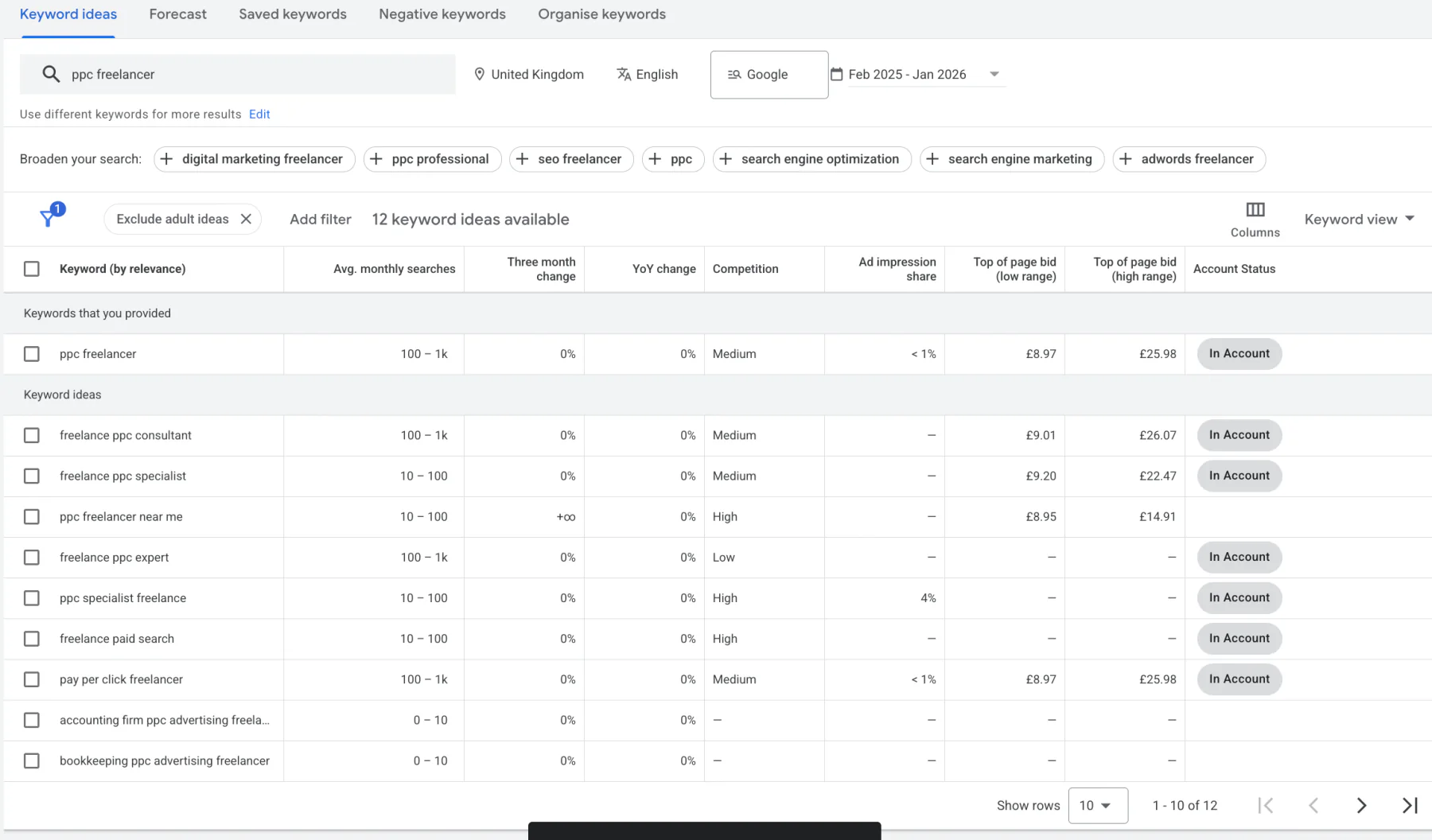
Use Keyword Research Tools
Tools such as:
can help you discover:
Search volume
Keyword ideas
Commercial intent
Related searches
This gives you a solid starting point before your campaigns go live.
Use Your Existing Google Ads Data
If your account has been running for three months or longer, your own data is often your best source of information.
Take a look at your:
Search Terms report
Conversion data
Click-through rates
Cost per conversion
You'll often discover search terms that consistently generate leads.
These can then become new keywords within your account.
Don't Be Afraid to Remove Keywords
Optimising a Google Ads account isn't only about adding more keywords.
Sometimes the best optimisation is removing them.
If a keyword has been running for a reasonable amount of time and hasn't produced meaningful results, consider:
Pausing it
Replacing it
Testing a more relevant variation
Just remember to make decisions based on enough data rather than reacting too quickly.
The goal isn't to have the biggest keyword list.
The goal is to have the most profitable keyword list.
My Final Thoughts
So, is adding too many keywords bad for Google Ads?
My answer is both yes and no.
Adding lots of keywords isn't automatically a bad thing. However, if your budget is relatively small, having too many keywords can make your account harder to manage and much more difficult to optimise effectively.
The more your clicks and conversions are spread across dozens of keywords, the longer it takes to understand what's actually driving results.
Focus on building a keyword list that's appropriate for your budget and gives you enough data to make confident optimisation decisions.
If you're unsure whether your Google Ads account has the right keyword strategy, I offer a free Google Ads audit. I'll review your account, identify any opportunities for improvement, and explain exactly what I'd change to help improve performance.
If you'd like me to take a look, simply get in touch via the contact page on jonnyswiftppc.com.
Related Google Ads Guides
Learn more about choosing, reviewing and managing the keywords used within your campaigns: