

Exact match keywords can be extremely useful when you want to target very specific search terms within your niche.
Unlike broad or phrase match keywords, which can sometimes be too wide-reaching, exact match keywords help streamline your ads so they appear for more commercial, high-intent searches. This makes them particularly suitable for businesses that want tighter control over their Google Ads spend.
Below is a step-by-step guide on how to set up exact match keywords in Google Ads, followed by the key pros and cons you should be aware of.
How to Set Up Exact Match Keywords
If you are running an existing campaign, follow these steps:
Log in to your Google Ads account.
2. Go to Campaigns.
3. Select Audiences, keywords and content.
4. Click on Keywords.
5. Click the blue plus button. When you hover over it, it should say Keywords
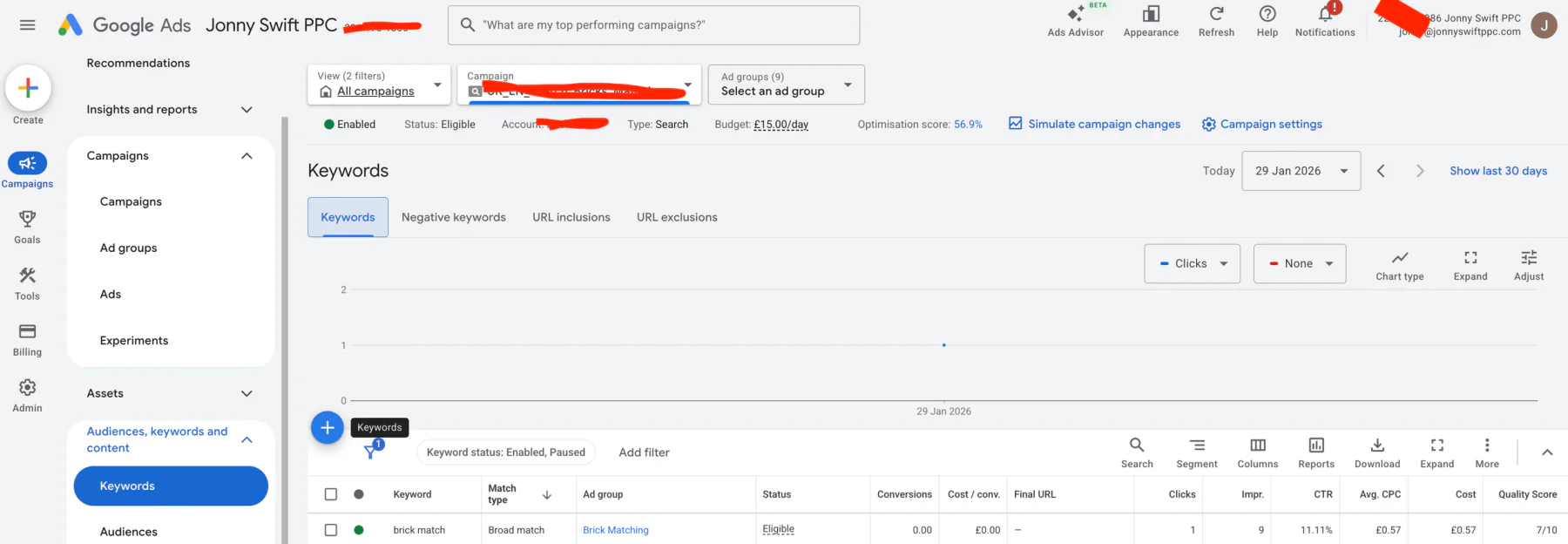
6. Select the ad group you want to add keywords to.
7. Add your chosen keywords into the keyword field.
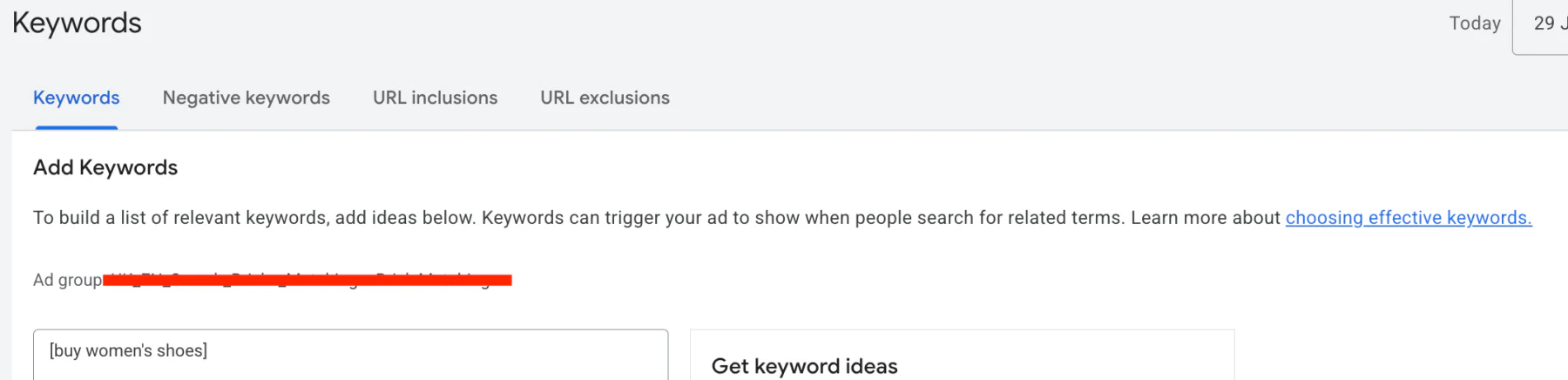
To make a keyword an exact match, you need to place brackets around the text.
For example:
[buy women’s shoes]
Once you have added your keywords, simply click Save.
The square brackets indicate an exact match keyword, rather than phrase or broad match. Build a focused list around the products or services you actually sell. You do not need to add every spelling variation, because Google can already match close variants.
Does Exact Match Mean the Exact Words?
No. Exact match can also show your advert for searches with the same meaning or intent, including close variants. For example, a different word order or a similar way of asking for the same service may still match.
It gives you more control than broader match types, but it does not automatically make every search commercial or relevant. Check your search terms report and add negative keywords where needed. Google explains this in its keyword matching guide.
Pros and Cons of Exact Match Keywords
Even though I have found exact match keywords to be very useful, there are some potential drawbacks that are worth considering.
| Positives | Negatives |
|---|---|
| Allows you to target highly commercial, purchase-driven search terms | You may struggle to spend your full budget if keywords are too restrictive |
| Reduces wasted spend on informational or irrelevant searches | Cost per click is often higher due to increased competition |
| Less keyword management and fewer irrelevant search queries | You may miss out on valuable keywords you have not yet identified |
Conclusion
Exact match keywords are an important tool for streamlining your Google Ads budget into key phrases that people are actively searching for when looking for your services. By focusing on high-intent searches, you can reduce wasted spend on broader terms that may not convert.
If you would like a 30-minute consultation, I help businesses worldwide with their Google Ads. I would love to speak with you about your business and see whether external support could help you improve your results.