

When you set up Google Ads, Google gives you plenty of suggestions about which bidding strategy to use. Maximise Conversions, Target ROAS, Impression Share, Manual CPC, Maximise Clicks: there are a lot of options, and it is not always obvious which one fits your business.
In this blog post, I’m going to narrow it down to the three options I would focus on in 2026: Maximise Conversions, including Target CPA, Target ROAS and Maximise Clicks. I’ll explain which one I would choose for sales, enquiries or website traffic, then show you where to change it.
This guide mainly covers Search campaigns. The strategies available depend on your campaign type, so you will not see every option in every campaign.
Which Google Ads Bidding Strategy Should You Use?
- For more sales or enquiries: Maximise Conversions. Once you have enough reliable conversion data and a realistic cost per conversion to aim for, consider Target CPA.
- For sales value and return on ad spend: Target ROAS, provided you track meaningful conversion values.
- For website traffic: Maximise Clicks. This aims for clicks, rather than purchases or enquiries.
All three automate your bids, but they work towards different objectives. Getting Google to chase the right objective is more useful than choosing whichever option it happens to recommend.
Maximise Conversions and Target CPA: For Sales or Enquiries
If the number of sales or enquiries is your priority, Maximise Conversions is the option I would look at first. Google adjusts bids at auction time to try to get as many tracked conversions as possible within your budget.
It uses signals such as the person’s device, location and search context to assess how likely an opportunity is to convert. You do not need to set a separate bid for every keyword.
However, Google needs to know what a useful conversion actually is. If you want enquiries but optimise towards ordinary page views, you are asking it to chase the wrong thing. Before changing your bidding, check that your conversion tracking works and that the campaign’s conversion goals match the actions you want.
When Would I Add a Target CPA?
My practical starting point is Maximise Conversions without a target when you have fewer than around 30 conversions in the last 30 days. Once you are consistently getting around 30 or more, I would consider Target CPA if you want to control the average amount you pay for a sale or enquiry.
That is my benchmark, rather than a universal Google requirement or a reason to change settings automatically on conversion number 30. Tracking quality, conversion delays and how consistent your results are still matter.
CPA means cost per action, often described as cost per acquisition. For example, a £25 Target CPA asks Google to work towards an average cost of £25 per conversion. Some conversions can cost more and others less; it is not a fixed price or a guaranteed maximum.
Base the target on what your campaign has been achieving and what your business can afford. Setting a very low CPA does not suddenly make leads cheaper. It can restrict traffic and leave you with fewer conversions.
Google’s Maximise Conversions guidance makes the distinction: without a target, the strategy aims to use your budget to maximise conversions; with a CPA target, it works towards your average cost objective.
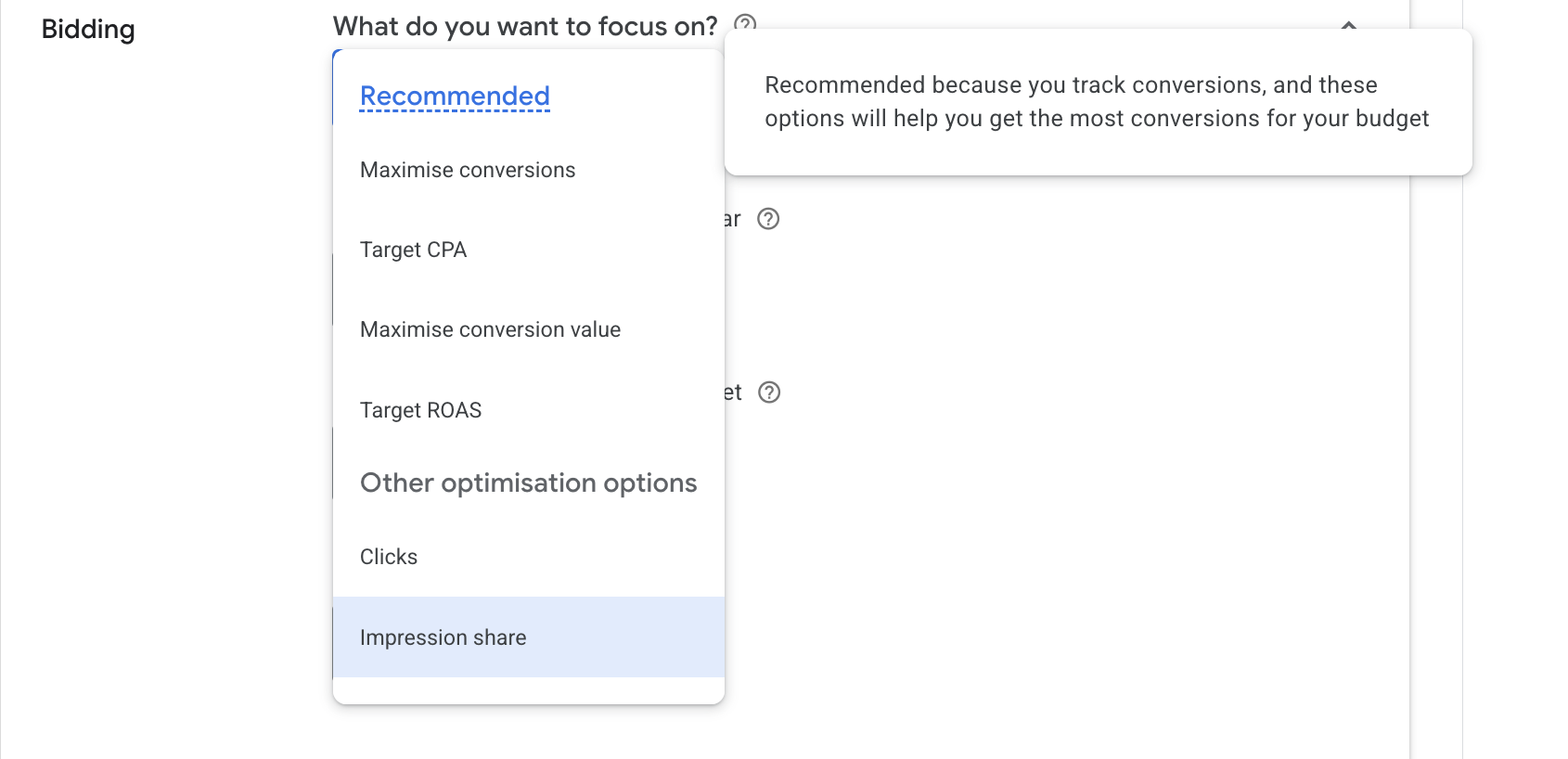
A note on the 2026 labels: you may know this as “Maximise Conversions with a Target CPA”. Google is changing the label to a standalone Target CPA option, as shown in my screenshot below. Google confirms that this naming change does not change how the strategy works.
For the settings in more detail, see how to set Target CPA in Google Ads.
Target ROAS: For Conversion Value and Revenue Return
If you care about how much revenue your sales generate, rather than simply how many sales come through, Target ROAS is worth considering.
ROAS stands for return on ad spend. It compares your tracked conversion value with the amount you spend on advertising. Target ROAS asks Google to maximise conversion value while working towards your chosen average return.
For example, 300% ROAS means £3 in conversion value for every £1 spent on ads. If you spend £100, a 300% return means £300 in tracked conversion value.
If you have worked out that 300% covers your costs while leaving room for profit and growth, that could be a suitable target. However, 300% is not automatically profitable. Product costs, delivery, fees and other expenses still need to be paid, and Google does not guarantee the return you enter.
Who Is Target ROAS Best Suited To?
E-commerce is the clearest fit because orders can have very different values. Ten £20 orders and ten £200 orders are the same number of conversions, but they produce very different revenue.
Lead generation businesses can use it too, provided you send meaningful values for your leads or completed sales. Those values should reflect the business opportunity, rather than an arbitrary figure added just to enable ROAS bidding. If you use estimated lead values, the reported return reflects those estimates rather than money already received.
I would normally want around 30 or more conversions in a month before using Target ROAS, alongside reliable value tracking. Again, that is my practical recommendation. Google currently lists a minimum of 15 conversions in the previous 30 days at the conversion tracking level for Search and Shopping; requirements differ for other campaign types.
Check your historical return before setting the target. A percentage that looks good on paper can restrict spending if the campaign cannot realistically achieve it.
I have separate guides explaining what Target ROAS means and how to set Target ROAS if you want to go further.
Maximise Clicks: For Website Traffic
Maximise Clicks does what the name suggests: it aims to get as many clicks as possible within your budget. It does not optimise bids for conversions.
Some advertisers like using it to get sales or enquiries as well. My concern is that you can end up paying for plenty of traffic that does very little for the business. More clicks do not necessarily mean more customers.
However, if visits are the immediate objective, it can be useful. You might have a landing page promoting an in-store offer and want relevant people to visit that page and see the details. In that situation, traffic itself can be a reasonable goal.
Google’s Maximise Clicks guidance also explains the option to set a maximum CPC bid limit. That gives you some control over bids, although a limit that is too low can restrict traffic.
You should still check your search terms and whether those visitors do anything useful once they arrive. If sales or enquiries are the real objective, I would generally look towards conversion-based bidding.
What About Manual CPC and Brand Bidding?
Manual CPC used to be a much more common choice. I personally see it as outdated for the sort of campaigns I’m discussing here, and I do not know anyone personally who still uses it. It remains available in supported campaign types, but it is not one of my main recommendations in this guide.
A small exception to my shortlist is Target Impression Share for brand bidding. Sometimes you want your advert to appear prominently when someone searches for your company name. It can suit that visibility goal, although I would not use it automatically for every brand campaign.
Maximise Clicks can also be useful for a tightly controlled brand campaign because those searches are already highly relevant to your business. Whether it makes sense depends on whether your priority is traffic, visibility or conversions.
I have covered the wider decision in my guide to controlling brand bidding in Google Ads.
How to Change Your Bidding Strategy in Google Ads
You change the campaign’s bidding strategy in its campaign settings. You do not select a separate strategy for each ad group, although some strategies support ad-group target settings.
1. Open Your Campaign Settings
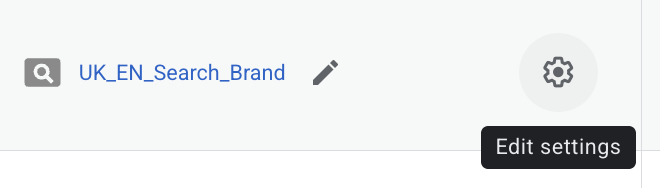
Go to Campaigns and select the campaign you want to change. Open Settings. In the view shown below, you can use the cog wheel beside the campaign name.
2. Open Bidding and Choose Your Strategy
Scroll to Bidding and expand the section. Select Change bid strategy if that option appears, then choose the strategy or focus you want.
3. Check Any Targets and Save
If you choose Target CPA or Target ROAS, enter a realistic target. Check the campaign’s budget and conversion goals as well, then click Save.
These steps follow my screenshots and Google’s campaign bidding instructions. After changing the strategy, allow for your conversion delay and any learning period before judging the results. Review the objective you chose: conversions and CPA, conversion value and ROAS, or useful website traffic.
My Recommendation
Choose your bidding strategy around what you want the campaign to achieve. For sales or enquiries, I would start with Maximise Conversions and consider Target CPA once there is enough reliable data. For revenue return with meaningful conversion values, consider Target ROAS. For traffic as the immediate goal, Maximise Clicks can make sense.
If you are unsure whether your current strategy fits your business, request a free Google Ads audit. I can review your bidding and tracking and show you where the account could be improved.