

To set Target CPA in Google Ads, open your campaign settings, find the bidding section and enter the average cost per conversion you want the campaign to aim for.
The setting is simple. Choosing a target that gives the campaign room to work takes more thought. This guide covers an existing Search campaign, the checks to make before saving and what to look at afterwards.
If you are still deciding whether to use it, read what Target CPA is and how it works first.
1. Check Your Conversion Tracking and Current CPA
Before changing bidding, check that the campaign is counting the results you actually want. A completed enquiry and a visit to a contact page are different things.
Review the campaign’s conversion goals, then test your conversion tracking if the numbers look wrong. Adding a target will not fix an incorrect conversion action.
Look at Cost / conv. over a representative period. Allow for the delay between a click and a conversion, and avoid choosing a target from one unusually good day.
For example, if genuine leads have recently cost around £30 each, a £5 target is a very different demand. A starting point close to the existing average follows the approach I describe in my Target CPA guide. Whether £30 is commercially acceptable is a separate question about your margins and lead quality.
2. Open the Campaign Settings
Go to Campaigns → Campaigns, select the Search campaign you want to change and open Settings. Find and expand Bidding.
Check the campaign name before editing. Also check whether it uses a standard campaign strategy or a portfolio strategy shared with other campaigns.
3. Select Maximise Conversions and Add a Target
For a standard Search campaign using Maximise conversions, select the optional Set a target cost per action setting and enter your amount. If the campaign uses another strategy, use the bid-strategy change control to select Maximise conversions before adding the target.
Google may show Target CPA as a strategy label in some contexts. Menu labels vary by campaign type and account; the screenshot below shows the optional target within Maximise conversions.
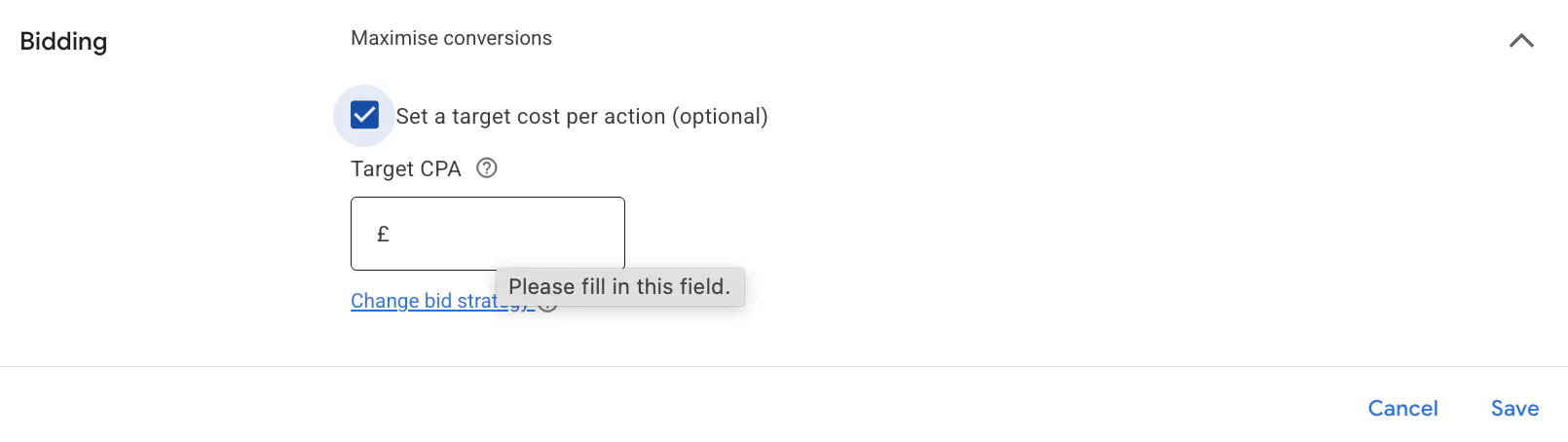
This is an average goal, not a maximum price for every individual lead. Google’s Target CPA documentation explains how the strategy works.
4. Save and Check the Amount
Select Save, then reopen the bidding settings to confirm the target. Check the currency as well as the number.
If you are changing an existing target, edit the amount in the same bidding settings and save again. With a shared portfolio strategy, a target change can affect other campaigns using that strategy. Check its scope before applying the edit; Google covers this in its guide to editing Target CPA.
5. Monitor Conversions, Spend and Lead Quality
After saving, watch conversion volume and Cost / conv. alongside total spend. A lower reported CPA is less useful if the account stops generating enough worthwhile enquiries.
Allow time for delayed conversions to arrive before judging the change. In my general guide, I explain why I monitor performance over several weeks and reduce targets gradually when results support it.
Record the change date so you can compare sensible periods. Change History can help you see whether other edits happened at the same time.
Why Has the Campaign Stopped Spending Its Budget?
A target that is too restrictive can reduce traffic. Check whether spend and conversions fell after the edit, and whether the campaign shows Limited by target.
Review tracking and recent demand as well. If the target is unrealistic for the account’s results, reconsider it rather than repeatedly lowering it to force a cheaper CPA.
Performance Max also supports a cost-per-action target when bidding towards conversions, but its setup screen differs from the Search walkthrough above.
If you would like help checking your account settings, you can request a free Google Ads audit.