

Congratulations, you’ve just created a new website. Now you want to know how long Google will take to find it and start showing it in search results.
Unfortunately, it isn’t instant.
Google’s guidance says crawling can take a few days to a few weeks. However, getting your website crawled and starting to receive regular impressions are different things. There isn’t a guaranteed deadline for either. Google’s crawling guidance explains what to expect.
In this article, I’ll show you a real example of a brand-new website, explain what happened after launch, and cover the steps you can take to help Google discover your pages.
Before You Start, Submit Your Sitemap
Before worrying about how long everything takes, make sure you’ve given Google a clear way to find your website.
For a new site, I recommend setting up Google Search Console and submitting your sitemap.
A sitemap is a file that lists the pages on your website. Submitting it gives Google a way to discover those URLs, which is particularly useful when your domain is brand new and has no backlinks.
Google can find websites without a sitemap by following links from other websites. However, if nobody links to your new site, discovery can be more difficult. Google specifically identifies new websites with few external links as a situation where a sitemap can help. See Google’s sitemap guidance.
The practical point is simple: don’t launch your website and assume everything has been picked up.
Verify your website in Search Console, submit your sitemap URL, and check that Google can read it. You submit the sitemap’s address rather than uploading your website itself.
Submitting a sitemap helps with discovery, but it doesn’t guarantee that every page will be crawled or indexed.
Crawling, Indexing and Impressions Are Different
People often use “crawling” to mean “appearing on Google”, but there are a few separate stages:
- Crawling: Google visits a page and retrieves its content.
- Indexing: Google processes the page and may include it in its search index.
- Search visibility: An indexed page can appear for relevant searches and receive impressions or clicks.
A page can be crawled without being indexed. Being indexed also doesn’t mean it will rank prominently for the searches you want to target. Google explains these stages in its guide to how Google Search works.
That distinction matters when looking at the example below. The graph shows when the website started receiving impressions and clicks, rather than exactly when Google first crawled it.
A Real Example: A Brand-New Website With No Backlinks
For this example, I’m using a completely new website on a newly registered domain, with no previous website history and no backlinks at launch.
I submitted its sitemap to Google Search Console on 9 August 2026.
It took around a week to receive its first impressions and a click. After roughly two weeks, impressions started increasing much more noticeably.
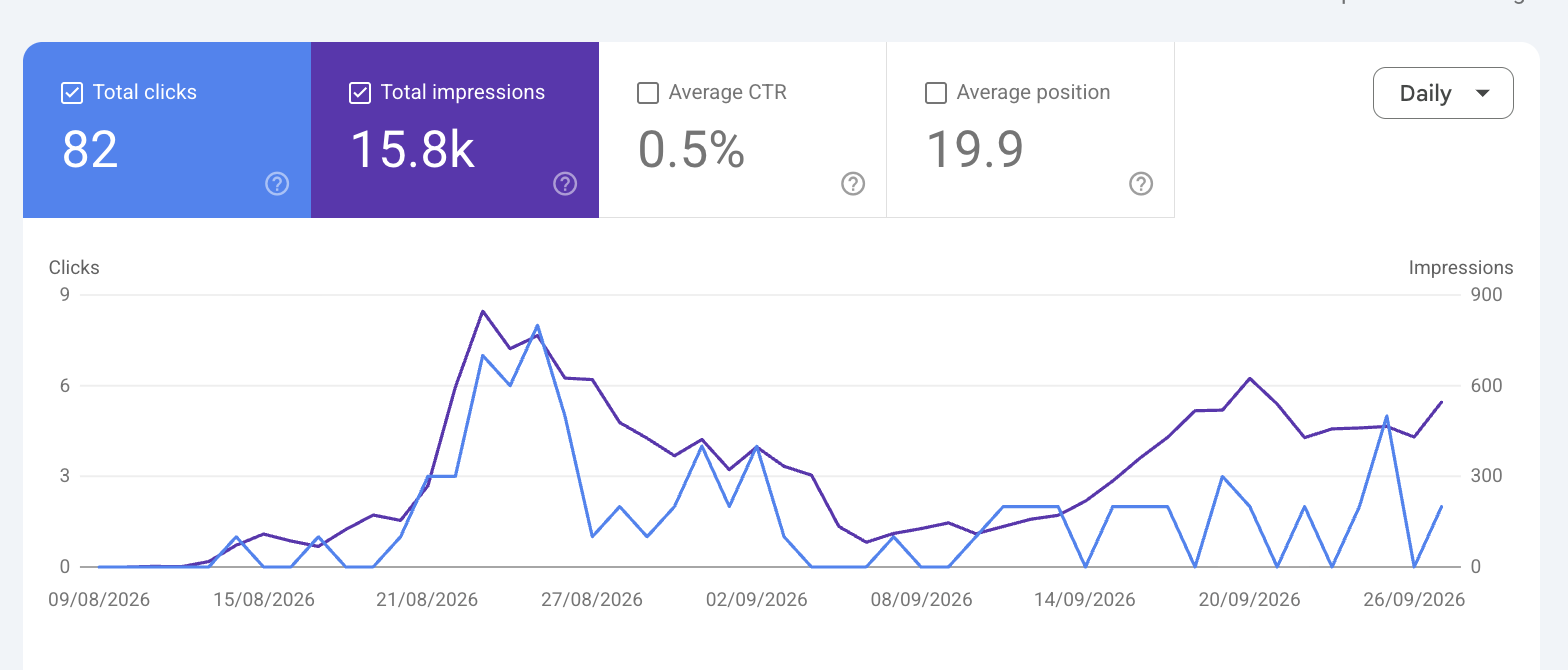
Across the period shown, the website received 15.8k impressions and 82 clicks.
However, this website launched with a large number of pages using a programmatic SEO approach. That means creating pages at scale using a repeatable structure, rather than publishing every page individually.
This matters because it had more pages that could potentially appear for different searches. A small website with five service pages may have a very different pattern.
Publishing more pages doesn’t automatically mean Google will index them all or that they will perform well. Each page still needs to offer something useful.
Why Did Impressions Rise, Then Drop?
You can see an initial increase in impressions, followed by a drop and then another period of growth.
During that time, I made updates to the website. The later increase happened as the site developed, but the graph alone doesn’t tell us exactly why visibility changed.
It would be too simple to say that Google suddenly “trusted” the website more. Changes in rankings, indexed pages, search demand and the updates themselves could all have contributed.
The main thing to take from this example is that early progress wasn’t a straight line. A good first fortnight didn’t mean impressions would keep increasing every day.
Can You Help Google Crawl Your Website Quicker?
A lot of people get impatient when launching a website. In many cases, my recommendation is to be patient once the basics are in place.
However, one thing I sometimes do with a new website or an important new page is request indexing through Google Search Console.
1. Inspect the Full Page URL
Open the correct website property in Search Console.
At the top, use the URL inspection bar to enter the full address of the page you want Google to check.
For your homepage, that would be your homepage URL. For a new service page or blog post, enter that page’s specific URL.

2. Review the Result and Request Indexing
Read the inspection result and check for any problems. You can use Test live URL to check the current page, particularly if you’ve just fixed an issue.
Then select Request indexing to ask Google to crawl it. A successful live test doesn’t guarantee indexing. See Google’s URL Inspection documentation.
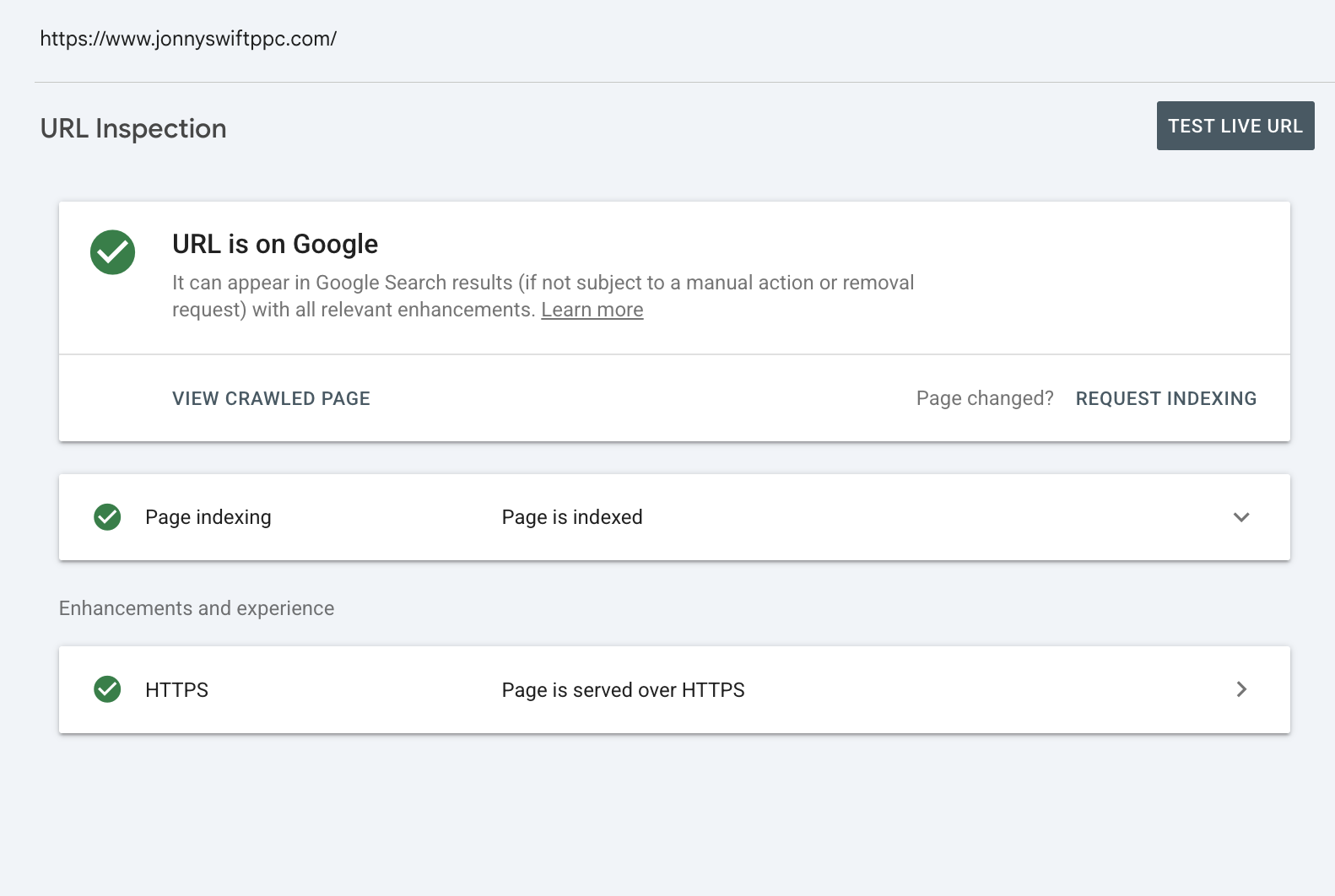
In my experience, I’ve seen pages appear on Google within around 48 hours after requesting indexing when there are no obvious problems.
However, that is an observation from using the tool, rather than a deadline Google promises. Other pages can take longer.
I’ve also covered the process in my YouTube tutorial. For a written walkthrough, see my guide on how to request reindexing on Google.
What Does Google Officially Say?
Google says crawling can take a few days to a few weeks.
It also explains that:
- Requesting a crawl doesn’t guarantee immediate inclusion in search results, or inclusion at all.
- Repeatedly requesting a crawl for the same URL won’t make it happen faster.
- URL Inspection is suitable for individual URLs, while a sitemap helps Google discover larger numbers of pages.
That’s why I’d use a sitemap for the website as a whole and reserve manual requests for a small number of important pages. You can read Google’s official guidance for more detail.
What If Your Website Still Isn’t Showing?
If you’re seeing no progress, check whether there is a problem rather than assuming you just need to wait longer.
Useful checks include:
- Can the page be opened without a login?
- Is Googlebot blocked by robots.txt?
- Does the page have an unintended noindex instruction?
- Is the server returning an error?
- Can visitors reach important pages through your website’s navigation and internal links?
Google’s technical requirements include allowing its crawler access, returning a successful response and providing indexable content. Meeting those requirements makes a page eligible for indexing, but doesn’t guarantee it. See Google’s technical requirements.
Use URL Inspection to investigate individual pages. Its crawl information can help you distinguish between a page Google hasn’t visited and one it has visited but hasn’t indexed.
Your Industry Also Affects What You See
Once pages are indexed, impressions depend partly on what people search for and where your pages appear.
A popular topic may have more potential searches, but it can also have stronger competition. A niche topic may have fewer searches, even when your page ranks reasonably well.
This affects search visibility rather than simply determining how quickly Google crawls your website.
If you’re considering PPC while your organic presence develops, my guide to how PPC and SEO work together explains how the two channels can fit into a wider marketing plan.
Conclusion
So, how long does it take Google to crawl a new website?
Google’s guidance is a few days to a few weeks. In the example above, the website started receiving impressions and a click after around a week, with a more noticeable increase after roughly two weeks.
For planning purposes, I’d allow anything from a week to a couple of months to start seeing search visibility develop. That is a broad expectation, rather than a guaranteed timeline for crawling or impressions.
Submit your sitemap, make sure your pages are accessible, and request indexing for important URLs where appropriate. Relevant links from other websites can also help Google discover your site.
After that, patience is something I recommend. Keep improving the website and use Search Console to check what is happening, rather than repeatedly submitting the same page.
If you’d like help planning how to generate traffic and enquiries for your new website, get in touch and I’d be happy to discuss it.