

You might be thinking about running Google Ads, or perhaps you have tried it before but did not get the results you wanted.
That does not necessarily mean Google Ads cannot work for your business. It may mean the account did not have enough time, the budget was too limited for the market, the campaigns were optimising towards the wrong outcome or too much money was going towards irrelevant searches.
In this guide, I’ll explain how I make Google Ads accounts successful in the long term, rather than creating a short improvement that disappears or treating the platform as a quick test.
How Do You Make Google Ads Successful? The Short Answer
To make Google Ads successful, you first need to define what a profitable result means for your business. You can then build the account around that goal, collect enough reliable conversion data, use an appropriate bidding strategy, remove wasted search spend and give the campaigns enough time to improve.
The important thing is not simply getting more clicks. It is attracting the right people at a cost that makes commercial sense over the full value of the customer.
What Does Google Ads Success Look Like?
Google Ads has continued to work for many businesses, otherwise advertisers and specialists would not keep investing time and money in it. However, success does not look the same in every account.
For an E-commerce Business
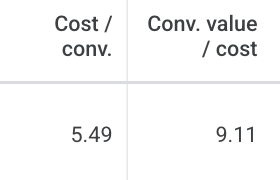
An online shop will often judge success using return on ad spend (ROAS), cost per conversion and the profit left after product costs and other expenses.
A strong ROAS number is not automatically profitable for every retailer. A business with tight margins may need a higher return than one with more room in its pricing, so your target should come from your own figures.
For a Lead-Generation Business
A lead-generation business will normally focus on the cost per genuine enquiry and how many of those enquiries become paying customers.
A £50 lead can be excellent value if a suitable new customer is worth thousands of pounds. The same lead cost could be unsustainable for a low-value one-off service. Lead quality and close rate matter alongside the number shown in Google Ads.
Look Beyond the First Sale
It is also worth considering what a customer is worth after their first purchase or payment.
Someone may buy again, pay an ongoing management fee or recommend the business to somebody else. That longer-term value can make an acquisition profitable even if the return from the first transaction looks modest.
For my own business, for example, a client might pay a one-off setup fee before moving onto ongoing management. Looking only at the first payment would miss an important part of the commercial value.
This does not mean ignoring immediate performance. It means measuring it in the right context rather than treating every customer as a one-off transaction.
Changes That Can Improve a Google Ads Account
There are many possible changes inside a Google Ads account. These are some of the main areas I look at when shaping performance for the long term.
1. Optimise for Conversions, Not Just Cheap Clicks
Some businesses use a click-focused bidding strategy because it appears to bring more traffic for the budget. However, a larger number of cheap clicks is not useful if those visitors do not turn into enquiries or sales.
Once the conversion tracking is reliable and the account has enough useful data, I normally prefer conversion-focused automated bidding. Depending on the business and campaign, that could include:
- Maximise conversions to generate as many conversions as possible within the available budget.
- Target CPA when the aim is to generate conversions around a target average cost.
- Target ROAS when conversions have different values and the account records those values accurately.
Google classifies these as Smart Bidding strategies and uses auction-time signals to set bids. You can read Google’s current explanation of automated bidding strategies.
Google Ads can technically use Smart Bidding without 30 previous conversions. In practice, I like an account to be generating around 30 conversions or more per month when I want to assess and stabilise a conversion-focused strategy. The right point to switch still depends on the campaign type, the quality of the tracking and how consistently the conversions arrive.
If you want to understand this option in more detail, read my guide to target CPA in Google Ads.
2. Check Search Terms and Add Negative Keywords
Your keywords are not always the same as the searches that actually trigger your ads.
This is especially important when using broad match. Google may connect your keywords with searches that do not reflect the product or service you want to sell.
I recommend checking the search terms report regularly and adding irrelevant searches as negative keywords. This helps stop the same types of unsuitable searches from continuing to spend your budget.
Google’s current navigation path is Campaigns → Insights and reports → Search terms. My guide to finding search terms in Google Ads explains what to review and how to add negatives.
3. Write Ad Copy Around What the Customer Wants
Ad copy is not the only part of a successful campaign, but it gives you an opportunity to stand out once your targeting is relevant.
Think from the customer’s point of view. What would make them choose your result over the businesses above and below it?
Your headlines and descriptions should communicate genuine selling points such as location, specialist experience, delivery options, guarantees or a useful offer. Avoid filling the ad with vague claims that any competitor could make.
My guide to writing Google Ads copy covers this in more detail.
How Long Should You Give Google Ads?
I have spoken to many businesses that decided Google Ads did not work after running it for only a few days or weeks.
I normally recommend approaching the first three months as an initial testing and improvement period. That is not a fixed Google Ads learning phase, and some campaigns produce useful results sooner, but it gives you a more realistic window in which to collect data, review search terms and make informed changes.
Performance at the beginning can be less efficient while the account gathers information. You should still watch spend carefully and fix obvious problems, but a weekly trial is rarely enough to judge the long-term opportunity.
Go into the first three months with a budget you can sustain and a plan to keep improving the account. My guide to how long Google Ads take to work explains the timeframe in more detail.
How Much Should You Spend?
Your budget should be large enough to generate useful traffic without putting the business in a difficult position if the first month is not profitable.
I normally start by checking Google Keyword Planner for a representative keyword. As a rough benchmark, I take the estimated upper bid range and multiply it by ten to work out a daily budget that could support around ten clicks.
For example, if the upper estimate is £2.27 per click, that method gives a starting daily budget of roughly £22.70.
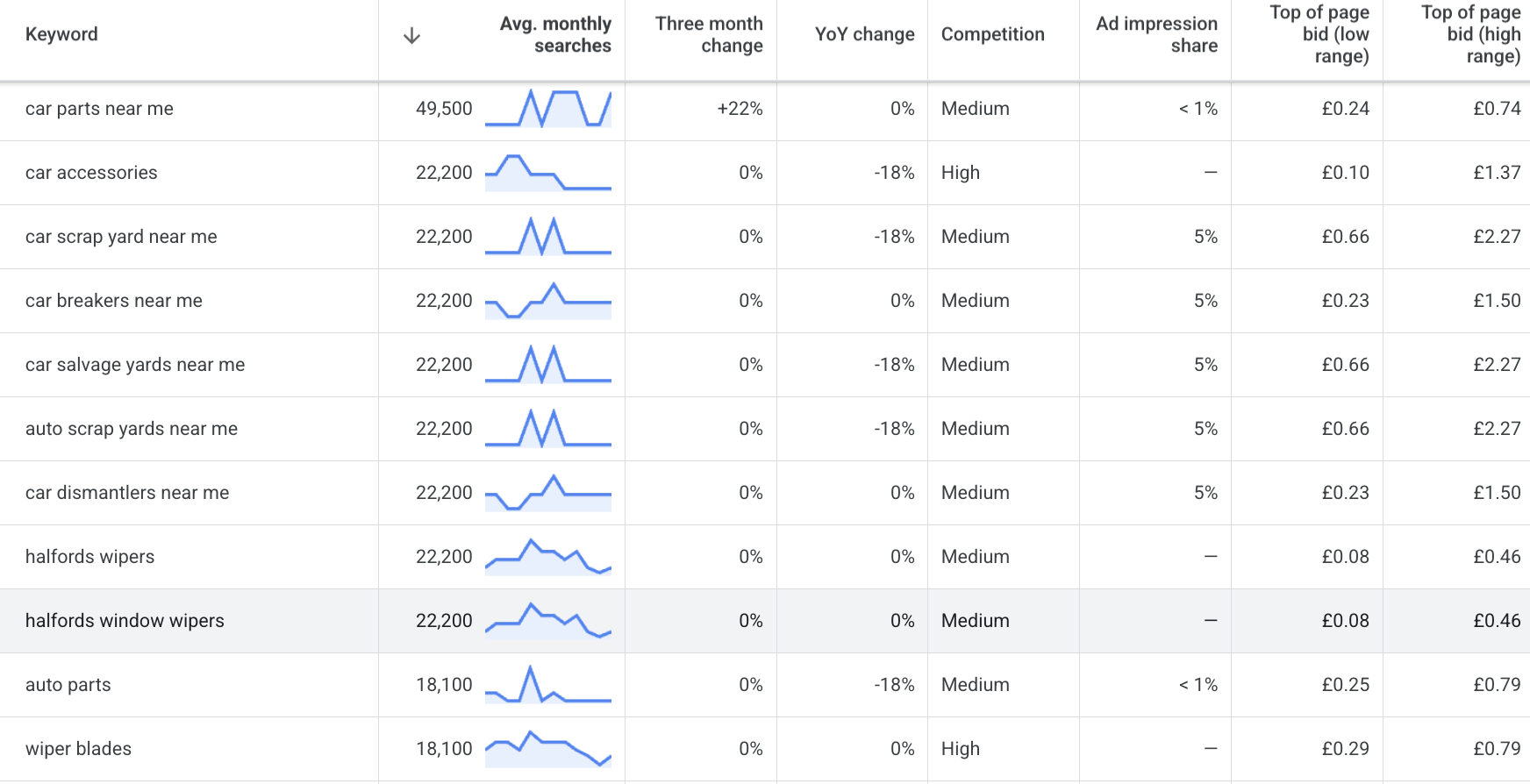
This is a planning benchmark rather than a promise about what every click will cost. Actual CPCs vary by auction, and ten clicks do not guarantee a conversion. The budget also needs to be something you are comfortable sustaining while the campaign gathers data.
Read how much you should spend on Google Ads for the full method.
Why Google Ads Sometimes Fails the First Time
If you have tried Google Ads before without success, it is worth checking whether:
- The campaign was judged after only a short test.
- Success was measured only by the first transaction rather than genuine customer value.
- The bidding strategy focused on traffic instead of meaningful conversions.
- Conversion tracking was inaccurate or optimising towards the wrong actions.
- Irrelevant search terms were allowed to keep spending budget.
- The ads did not explain why a customer should choose the business.
- The budget was too low to collect enough useful data.
These issues do not prove that Google Ads will work for every business. They do show why the result of one short or poorly measured campaign should not always be treated as the final answer.
Final Thoughts
You make Google Ads successful by defining a result that is genuinely profitable, measuring it accurately and giving the account enough time and budget to improve.
I focus on conversions rather than clicks, use automated bidding when the data is ready, remove irrelevant searches with negative keywords and write ads around what the customer actually wants. I then judge the return in the context of the customer’s wider value to the business.
If you have run Google Ads before without getting the result you expected, I can review the account and show you where the main opportunities are through my free Google Ads audit.
Related Guides
- How long do Google Ads take to work?
- How much should I spend on Google Ads?
- How to find search terms in Google Ads
- What is target CPA in Google Ads?
Check Whether Your Click Costs Support Your Goals
A campaign can attract relevant searches and still struggle if each click costs more than the business can afford. Before increasing spend, compare your click costs with your conversion rate and the value of a genuine lead or sale. My guide to what a good CPC looks like in Google Ads explains how to judge that relationship. If you are working with a smaller budget, also read when Google Ads works for a small business.