

If you’re running Google Ads and getting clicks through to your website but nobody is converting, it can be a real concern.
You can see the money leaving your account and people visiting your website, but you are not receiving the enquiries, telephone calls or sales you expected.
As a PPC freelancer, I get asked to diagnose this problem quite regularly.
There are many reasons why your website might not be generating conversions. In some cases, people may actually be converting, but your account is not recording them correctly. In others, there may be a problem with your targeting, adverts, offer or landing page.
Let’s go through some of the most common issues.
1. Your Conversion Tracking May Be Incorrect
The first thing to check is your conversion tracking.
Conversion tracking can be difficult to master if you have never set it up before. If it is not working correctly, Google Ads may report zero conversions even though people are contacting you or buying from your website.
For example, you may be receiving:
Contact-form submissions
Telephone calls
Email enquiries
Bookings
E-commerce purchases
If these actions are happening but not appearing inside Google Ads, the campaign may be performing better than you think.
Make sure your conversion tracking is airtight from the beginning.
Your important form submissions, telephone calls and purchases should all be tracked correctly. Otherwise, you cannot accurately judge whether the campaign is working.
Incorrect tracking also makes it much harder for automated bidding to improve. If Google cannot see which people are converting, it has less useful information to find similar customers.
I’m not going to explain the entire setup process here, but you can use my guide on how to test Google Ads conversion tracking to check whether your main actions are being recorded.
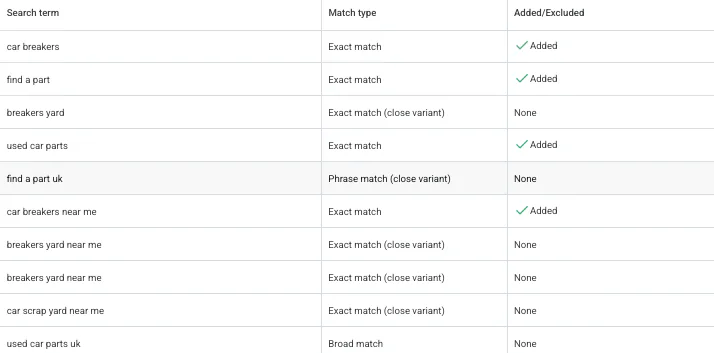
2. Your Search Terms May Be Irrelevant
A lot of people add keywords to Google Ads and trust that Google will only advertise to people searching for those exact things.
Unfortunately, that is not always how it works.
Google often tries to distribute your adverts more widely, particularly when you use broad or phrase match keywords. This can cause your adverts to appear for searches that are not relevant to your business.
Imagine that you sell televisions, but someone searching for a kettle lands on your website.
It is not surprising when they do not buy a television. The person was never suitable for your business in the first place.
This is why you should regularly check the actual search terms triggering your adverts.
Look for searches that are:
Completely unrelated to your business
Looking for free information
Searching for jobs or careers
Looking for a different product
Outside the intent of your campaign
Unlikely to become paying customers
You can then add unsuitable searches as negative keywords.
Keep your negative keywords updated as new searches appear. This prevents your budget from repeatedly being spent on people who are unlikely to convert.
I have separate guides explaining how to find search terms in Google Ads and how to check negative keywords.
3. Your Advert Does Not Match the Website
Another common problem is a mismatch between the advert and the website.
For example, your advert might promote:
40% Off Today
Someone clicks expecting to find the discount, but there is no clear mention of it on the landing page.
They may struggle to find the offer, assume it is no longer available or feel like the advert made a false promise. They then leave without converting.
Your advert and landing page should continue the same message.
If your advert mentions:
A discount
Free delivery
A free consultation
Same-day service
A particular product
A price
A guarantee
the landing page should make that information immediately obvious.
Do not make people search around the website to find the thing that persuaded them to click.
You should also regularly check your adverts for outdated promotions, prices and services. An advert written several months ago may no longer accurately represent what is available on your website.
4. Your Landing Page Is Poor
A landing page is the page someone reaches after clicking your advert.
Even if your targeting and adverts are perfect, a poor landing page can stop people from converting.
The page should make it very easy for someone to understand:
What you offer
How much it costs
Why they should choose you
What they need to do next
How they can contact you or make a purchase
For lead-generation businesses, I normally recommend including:
A clear contact form
A visible telephone number
Social proof
Reviews or testimonials
Examples of previous work
Basic information about the service
A clear call to action
Your main unique selling points
For e-commerce businesses, the buying process should be simple. Product information, prices, delivery details and checkout buttons should all be easy to find.
Avoid confusing people with too many different options.
You are paying for every person who visits through your advert. The page needs to guide them towards the next step without making them work it out themselves.
You can read more about this in my guide explaining what a PPC landing page is.
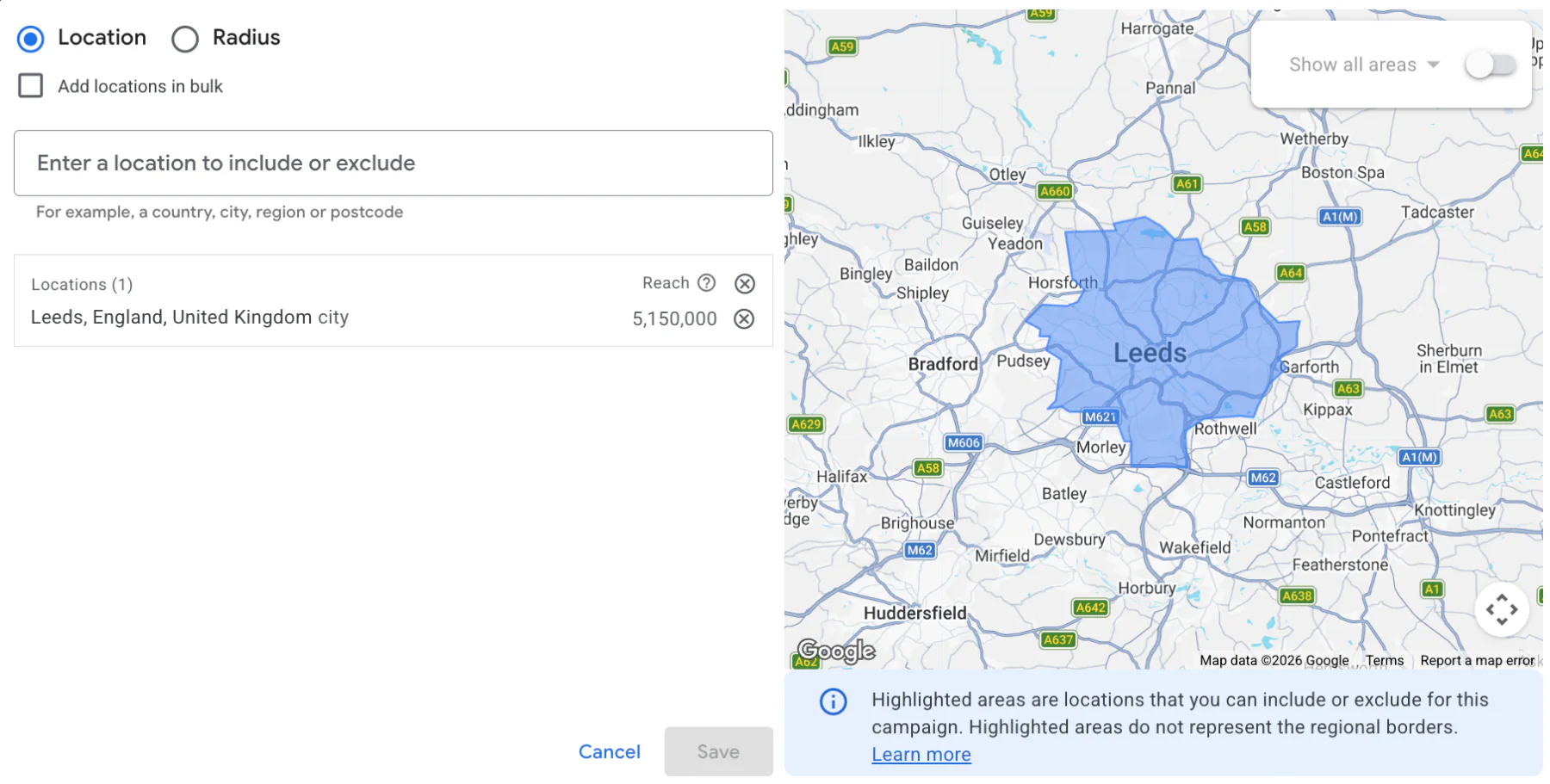
5. You Are Targeting the Wrong Locations
Location targeting is another area that can easily generate clicks without conversions.
If your business only operates in London but your adverts appear to people in Scotland, those visitors may have no way to use your service.
They might still click before realising that you do not cover their area.
Check that every campaign targets the locations your business can genuinely serve.
You should also review the location options within the campaign. Google may show adverts to people who have shown an interest in your location, even if they are not physically based there.
For most local businesses, I recommend using the presence option so adverts focus on people who are actually in the targeted area.
You can also add location exclusions for places you do not want to cover.
These are not negative keywords. They are separate geographic exclusions managed through your campaign’s location settings.
My guide on how to exclude locations in Google Ads explains exactly where to find these settings.
6. Your Offer May Be Too Weak
Sometimes there is nothing technically wrong with the campaign.
The problem may be the offer itself.
Potential customers often compare several businesses before making a decision. If your competitors provide better prices, stronger guarantees or a more attractive overall package, people may click your advert but choose someone else.
Take a look at competing businesses and compare:
Prices
Delivery costs
Response times
Guarantees
Reviews
Experience
Product quality
Promotions
What is included in the service
You do not always need to be the cheapest.
You may have a unique selling point that justifies charging more. Perhaps you provide better quality, faster delivery, more experience or a stronger guarantee.
However, that advantage needs to be clear on the landing page.
If your price is higher and the visitor cannot see why, they may simply go with the cheaper competitor.
Good advertising can bring people to your website, but it cannot completely fix an offer that is not competitive.
7. Your Budget May Be Too Small
I regularly see businesses start Google Ads with an extremely small budget because they want to test the platform carefully.
That is understandable, but a budget that is too small may not produce enough clicks or data to generate conversions consistently.
For example, if the normal cost per click in your industry is £10 and your daily budget is £2, you may not receive a click every day.
It becomes almost impossible to judge performance from that amount of traffic.
A useful starting point is Google Keyword Planner.
Search for an important commercial keyword and look at the higher estimated cost per click. I generally recommend multiplying that figure by ten to estimate a budget capable of generating roughly ten clicks per day.
For example:
Estimated CPC: £5
Target clicks per day: 10
Starting daily budget: approximately £50
This is not a fixed rule. Actual click costs vary, and some industries are far more expensive than others.
However, it provides a more realistic starting point than choosing an arbitrary budget of a few pounds per day.
You can read my full explanation in How Much Does Google Ads Cost?.
8. The Campaign Has Not Had Enough Time
Sometimes patience is the best thing for a new Google Ads campaign.
Businesses regularly contact me after running adverts for a few days because they expected immediate results.
The first two weeks can easily be the weakest period, particularly when using an automated bidding strategy such as Maximise Conversions.
Google is still trying to understand:
Which searches are relevant
Who is most likely to convert
How much it should bid
Which times and devices work best
What a valuable customer looks like
This normally improves as the campaign collects more clicks and conversion data.
If you are receiving relevant traffic and the occasional conversion, performance may begin to catch up over time, provided the rest of the setup is correct.
That does not mean you should ignore obvious problems.
If the search terms are completely irrelevant, tracking is broken or the website does not work, waiting will not magically fix everything.
But if the foundations are correct, avoid making drastic changes every day. Constantly changing budgets, bidding and targeting can make it more difficult to understand what is working.
My guide on how long Google Ads take to work gives a more detailed timeline.
Clicks Do Not Always Mean Success
A lot of people assume clicks are the most important part of Google Ads.
The thinking is that if enough people click, eventually someone will convert.
Unfortunately, not every click has the same value.
An informational search may be cheaper but have very little chance of generating revenue. A more expensive commercial search could be much more valuable because the person is ready to buy.
For example:
“How do televisions work?” is mainly informational.
“Buy 55-inch television with next-day delivery” shows much stronger purchase intent.
The second click may cost more, but it is likely to be far more useful to the business.
Do not focus only on generating the highest possible number of clicks.
The goal is to attract relevant people and turn them into profitable customers.
The most important figures will normally be:
Conversions
Cost per conversion
Conversion value
Return on ad spend
Lead quality
Actual profit
Clicks help people reach your website, but clicks alone do not make a campaign successful.
Conclusion
If your Google Ads are receiving clicks but no conversions, start by checking whether the conversions are being tracked properly.
You should then review:
Conversion tracking
Search terms and negative keywords
Advert messaging
Landing-page quality
Location targeting
Your offer and pricing
The available budget
How long the campaign has been running
There is not always one simple reason.
Sometimes several smaller issues combine to prevent the campaign from working. Irrelevant searches, a confusing landing page and a limited budget together can quickly lead to wasted spend.
The main thing is to diagnose the account properly rather than assuming that more clicks will solve the problem.
If you are interested in professional PPC management or would like me to investigate why your campaigns are not converting, feel free to get in touch through my contact page.