

Auto-apply recommendations is one of those Google Ads settings that can easily catch advertisers and business owners out.
Not everybody realises that recommendations have been set to apply automatically. When they are enabled, Google can make changes to your account without you manually approving each individual recommendation.
Those changes could affect your keywords, bidding, targeting, ads or other campaign settings. In some cases, they may move the account away from the strategy you originally set up.
The good news is that it is easy to turn off auto-apply on Google Ads once you know where to find the setting.
In this guide, I will show you:
Where to find your auto-apply settings
How to see which recommendations are enabled
How to switch them off
How to make sure your changes have been saved
Why I generally recommend turning auto-apply off
How to Turn Off Auto-Apply on Google Ads
To find your auto-apply settings, follow these steps:
Sign in to your Google Ads account.
Click Campaigns in the left-hand menu.
Select Recommendations.
Click Auto-apply in the upper-right corner of the page.
Open the Manage tab if it is not already displayed.
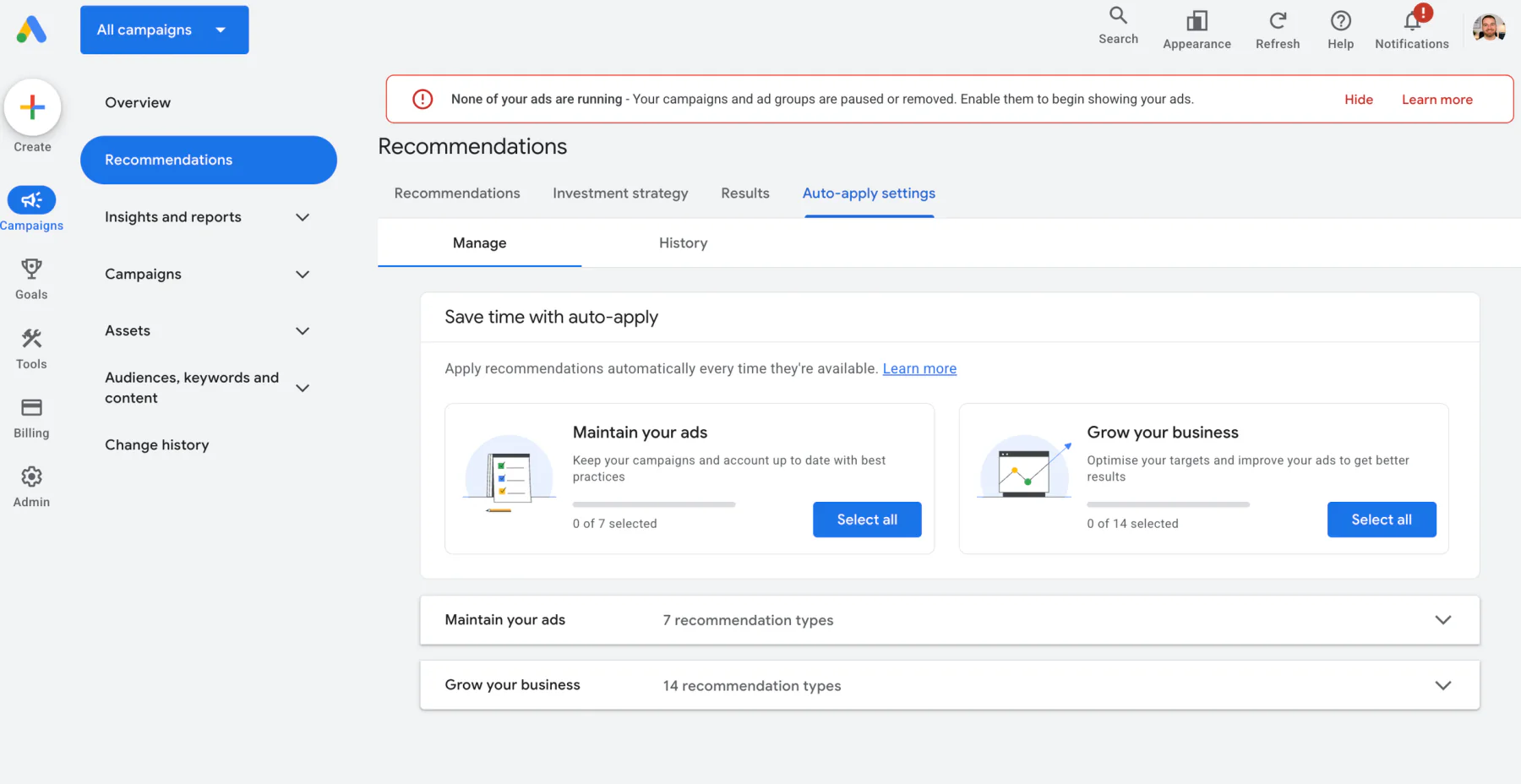
Google’s current instructions confirm that auto-applied recommendations can be managed from the Recommendations page within the Campaigns menu.
You should now see the recommendation types available for your account.
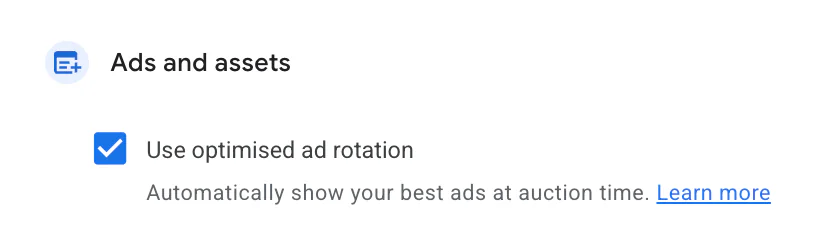
Scroll through the page and look for any recommendations that have been selected. An enabled recommendation will have its box ticked.
Untick the Enabled Recommendations
To turn off a recommendation, untick the box next to it.
There may be several categories and individual recommendations listed, so check the entire page rather than only looking at the first section.
If you want to stop all recommendations from being applied automatically, you will need to untick every selected option.
Google does not currently provide one simple master switch that reliably disables every individual recommendation in all versions of the interface. Carefully work through the available categories and confirm that no unwanted boxes remain selected.
How to Save Your Auto-Apply Settings
This is an important step because your changes will not take effect until they have been saved.
Once you have unticked the recommendations:
Look for the Save button and click it.
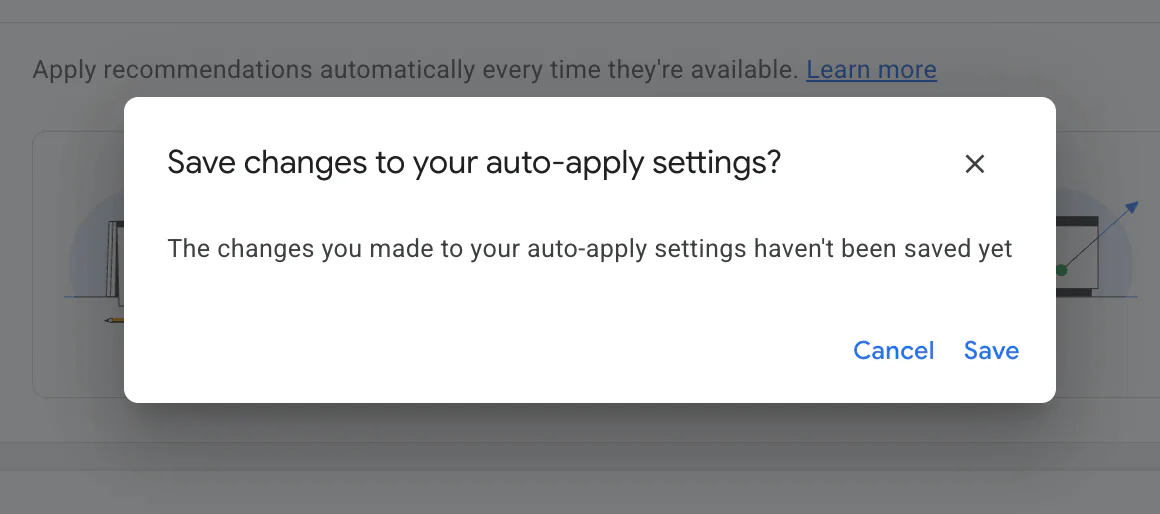
If a save prompt appears after you leave the section, select Save changes.
Return to the Auto-apply page and check that the recommendations remain unticked.
Google’s official guidance is to untick the recommendation you want to disable and then click Save.
The precise position and appearance of the save option can change as Google updates its interface. If the button is not immediately obvious, click away from the selection area and check whether a message appears asking you to save your auto-apply settings.
Do not assume that unticking the boxes has saved the changes automatically.
How to Turn Auto-Apply Back On
Turning recommendations back on follows the same process in reverse.
Go to:
Campaigns → Recommendations → Auto-apply
Tick the recommendations you want Google to apply automatically, then click Save.
I would avoid enabling every option without reviewing what each recommendation can change. A recommendation that is appropriate for one account may be unsuitable for another.
How to Check Whether Auto-Apply Has Made Changes
You can use the History tab to see more information about your account’s automatically applied recommendations.
From the Auto-apply page:
Select the History tab.
Review which recommendations have been applied.
Check when they were enabled.
Disable individual recommendation types where necessary.
Google also states that you can use the History tab to confirm when an auto-apply recommendation was first turned on. The account’s Change history can help identify the user who enabled it.
This is useful when you have noticed an unexpected change and want to understand where it came from.
I also recommend regularly reviewing your main Google Ads Change history. Changes made through recommendations appear in the account’s history, although not every recommendation can necessarily be reversed in full.
Why I Recommend Turning Auto-Apply Settings Off
I strongly recommend that most advertisers turn off auto-apply recommendations.
This does not mean that every Google Ads recommendation is bad. Some suggestions can be useful and may highlight genuine opportunities within an account.
The problem is the word automatic.
I prefer to review each recommendation individually and decide whether it supports the campaign’s actual objectives before applying it.
Auto-Apply Can Disrupt Your Existing Strategy
A properly managed Google Ads account should have a clear strategy behind it.
Decisions about bidding, keywords, targeting and campaign structure should be based on factors such as:
The company’s profit margins
Lead quality
Conversion data
Available budget
Geographic targeting
Search intent
The value of different products or services
An automated recommendation does not always have the full commercial context behind those decisions.
A suggestion may appear to improve an optimisation score while moving the account away from what the business actually needs.
Not Every Recommendation Is Right for Every Account
Google describes recommendations as suggestions designed to improve campaign performance and save time. Advertisers can choose which recommendations to apply automatically and can opt out at any time.
However, recommendations should still be assessed against the account’s real objectives.
For example, adding more keywords could increase traffic but also introduce less relevant searches. Changing a bidding strategy may be reasonable for an account with reliable conversion data but unsuitable for a newer campaign that has not collected enough meaningful data.
The right decision depends on the account.
Changes Should Be Reviewed Before They Go Live
In my experience, important Google Ads changes should normally be reviewed by a person before they are implemented.
Before applying a recommendation, I want to know:
What exactly will change?
Why is Google suggesting it?
Does it support the campaign’s objectives?
Could it increase costs or reduce lead quality?
How will I measure whether it worked?
Auto-apply removes much of that review process.
By leaving the recommendations switched off, you can still see Google’s suggestions without allowing them to make immediate changes to the account.
Do Auto-Apply Recommendations Work in 2026?
As of 2026, I do not believe auto-apply recommendations are reliable enough to be enabled across every Google Ads account without careful oversight.
That is my professional opinion based on managing campaigns, rather than a claim that every recommendation will cause poor performance.
Google’s automation continues to develop, and I expect its recommendations to become more useful over time. However, I do not think the technology is currently at a stage where every recommendation should be trusted automatically.
Google itself notes that the available recommendation types can change over time. For example, the “Add responsive search ads” recommendation was removed from auto-apply settings from 26 January 2026.
This is another reason to check the page regularly rather than treating auto-apply as a setting you can enable and forget about.
Conclusion
Turning off auto-apply on Google Ads is straightforward once you know where the setting is located.
Go to Campaigns, select Recommendations, open Auto-apply, and untick any recommendations you do not want Google to implement automatically. Most importantly, make sure you click Save and then check that your selections remain disabled.
My general recommendation is to keep auto-apply switched off and review each suggestion manually.
Google’s recommendations can sometimes be helpful, but they should be considered alongside your budget, profitability, conversion data and wider advertising strategy. No automated recommendation understands your business as well as someone who knows what a profitable customer or lead actually looks like.
If you’re interested in professional PPC management to grow your business, feel free to get in touch via my contact page at jonnyswiftppc.com/contact. I’d be happy to discuss how PPC can work for you.
Recommended Google Ads Guides
You may also find these Google Ads guides helpful: