

You might have heard about Auction Insights and how you can use them to help your business on Google Ads.
But where exactly do you find them, what do all the figures mean and how should you actually use the information?
In this blog post, I’m going to show you exactly how to find Auction Insights, which is nice and easy, and explain a few ways I use the report when managing campaigns.
Where to Find Auction Insights in Google Ads
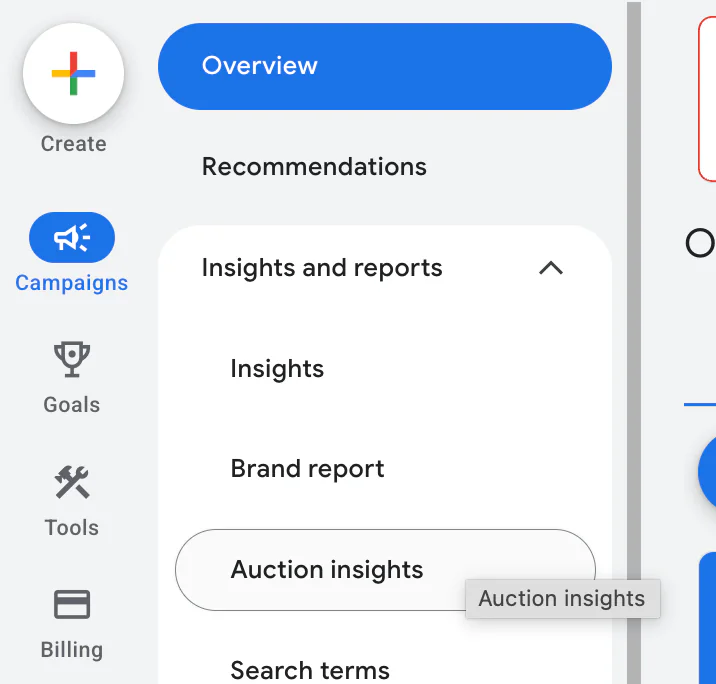
When you are logged into your Google Ads account, go to:
Campaigns → Insights and reports → Auction Insights
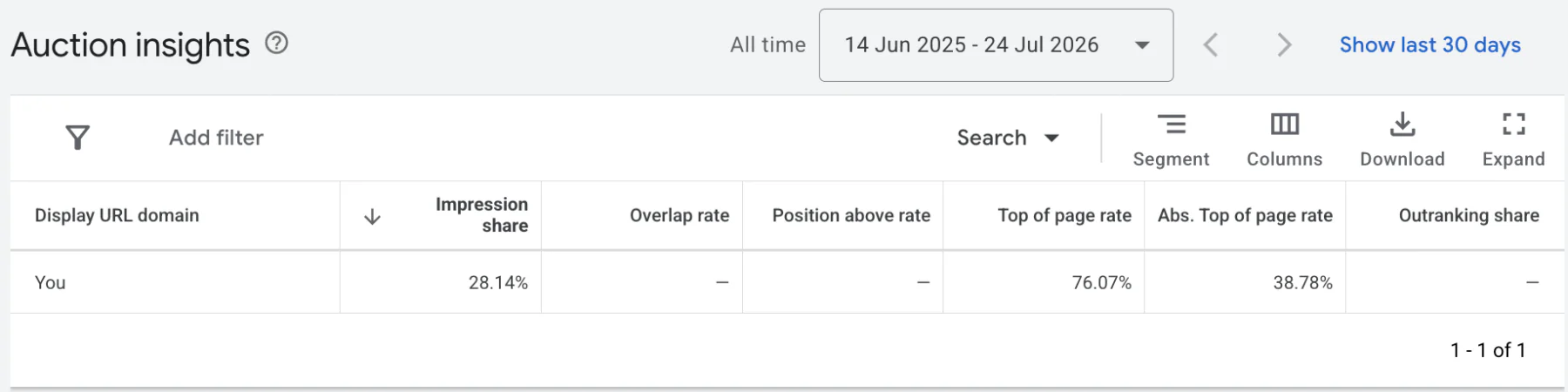
You should now see your own account alongside a list of other advertisers that have appeared in the same auctions as you.
In some cases, the report may be blank.
This usually means the campaign, ad group or keyword has not received enough activity during your selected date range. Google will not always provide Auction Insights when there is limited data available.
Try selecting a longer date range or checking a campaign with more impressions.
You can also filter the report by campaign or ad group. This is useful if you offer several services and want to see the competitors appearing for a particular part of your business.
What Do the Auction Insights Metrics Mean?
Auction Insights includes several different figures. They can look slightly confusing initially, but each one is actually quite straightforward.
Impression Share
Impression share shows how often your adverts appeared compared with the estimated number of times they were eligible to appear.
For example, if your impression share is 50%, your adverts appeared for approximately half of the eligible impressions available to you.
A lower impression share could be caused by your budget, bids, targeting or Ad Rank.
Overlap Rate
Overlap rate tells you how often another advertiser appeared at the same time as you.
If a competitor has an overlap rate of 60%, it means their advert appeared in six out of every ten occasions on which your advert also appeared.
This can help you identify the businesses you compete against most regularly.
Position Above Rate
Position above rate shows how often another advertiser appeared above you when both adverts were shown at the same time.
For example, a position above rate of 30% means that the competitor appeared above your advert three out of every ten times you both appeared.
This metric is only based on auctions where both advertisers received an impression.
Top of Page Rate
Top of page rate shows how often an advert appeared in one of the positions above the organic search results.
It does not necessarily mean the advert appeared first. It could have appeared in any of the available advert positions above the standard search results.
Absolute Top of Page Rate
Absolute top of page rate tells you how often the advert appeared as the first advert on the page.
This is the metric I tend to pay the most attention to when checking the position of a campaign.
If your absolute top of page rate is 80%, it means your advert appeared in the first advert position for 80% of its impressions.
Outranking Share
Outranking share shows how often your advert ranked above another advertiser or appeared when their advert did not.
This can help you compare your overall visibility against a particular competitor, rather than only looking at the occasions when you both appeared together.
How to Filter Auction Insights
You can use the filter option to narrow the report down.
For example, you can filter using:
Campaign
Ad group
Impression share
Overlap rate
Position above rate
Top of page rate
Absolute top of page rate
Outranking share
If you only want to see competitors with an impression share above 20%, you can select that metric, enter the figure and apply the filter.
You can also select a particular campaign or ad group.
This is normally more useful than looking at the whole account because different campaigns may compete with completely different businesses.
For example, a campaign advertising Google Ads management is likely to show a different group of competitors from one advertising SEO services.
How I Use Auction Insights
There are a few ways I use Auction Insights when managing campaigns.
I do not recommend making decisions entirely from this report, but it can give you a useful indication of your position in the market.
Using Auction Insights for Brand Campaigns
Auction Insights can be particularly useful for brand campaigns.
A brand campaign targets searches containing your own business or brand name. One of the main reasons for running one is to help prevent competitors from taking the most prominent advert position when someone searches specifically for your company.
I have previously explained how I control brand bidding in Google Ads, including how I try to keep brand clicks as cheap as possible.
Within Auction Insights, absolute top of page rate can help you see how regularly your brand advert appears in the first position.
You can also see which competitors are appearing in the same auctions and how often they rank above you.
If your absolute top of page rate is already very high—around 80% or more, for example—you may have room to reduce your maximum CPC and make the campaign cheaper.
Make a small reduction and monitor what happens to:
Clicks
Cost
Conversions
Impression share
Absolute top of page rate
If your clicks and conversions remain stable while your costs fall, you may have found a more efficient bid.
However, if competitors begin appearing above you more regularly or your clicks drop significantly, you may need to increase the bid again.
The right level will depend on how competitive your brand name is and how important it is for you to appear first.
Checking Where Your Non-Brand Ads Appear
You can also use Auction Insights to understand where your other adverts are appearing.
Generally, if you are using automated bidding with a strict cost-per-conversion target, Google may bid less aggressively in auctions where it believes someone is unlikely to convert.
This can result in a lower absolute top of page rate.
That is not necessarily a bad thing.
The main purpose of Google Ads is to generate profitable results, not simply make your advert appear first every time.
I would rather have a lower absolute top rate and generate affordable conversions than appear first constantly while paying far too much for every lead.
However, some businesses operate in markets where appearing prominently is particularly important. In those cases, Auction Insights can help you understand whether you are regularly being pushed below competitors.
Comparing Your Position Against Competitors
Auction Insights can also indicate whether you may be bidding more aggressively than the rest of the market.
For example, imagine your absolute top of page rate is 40%, while your closest competitors are nearer 20%.
This shows that your adverts are reaching the first position more often than theirs.
It does not definitely mean their bids are lower. Advert quality, relevance, landing pages and other Ad Rank factors also affect where an advert appears.
However, it may suggest that you have room to test slightly lower bidding.
Rather than making a large change, reduce your bid or target gradually and monitor the results.
If conversions remain stable but your cost per conversion improves, the lower bidding may be beneficial to your business over the long term.
You may see competitor visibility increase as the market becomes more competitive, so continue monitoring the report after making changes.
Should You Always Aim for the Absolute Top?
No.
Appearing in the first advert position can be useful, but it does not automatically mean the campaign is performing well.
You could have the highest absolute top of page rate in your market and still generate very few profitable conversions.
Always consider Auction Insights alongside:
Conversion volume
Cost per conversion
Conversion value
Return on ad spend
Lead quality
Available budget
Auction Insights tells you where you appear compared with other advertisers. It does not tell you whether those positions are profitable.
This is why I normally use the report as an indication rather than treating it as the final answer.
Conclusion
Finding Auction Insights in Google Ads is very straightforward.
Go to:
Campaigns → Insights and reports → Auction Insights
From here, you can see other advertisers entering the same auctions as you and compare impression share, overlap rate, position above rate, top of page rate, absolute top of page rate and outranking share.
The report can be particularly useful for brand campaigns, checking your position against competitors and deciding whether there may be room to test lower bids.
However, do not focus entirely on appearing first.
The most important part of Google Ads is getting results at a cost that works for your business. Auction Insights provides useful context, but conversions and profitability should still guide your decisions.
If you are interested in professional PPC management or would like someone to review how your campaigns compare with competitors, feel free to get in touch through my contact page.